SPF softfail after forwarding is usually the hop saying the forwarder was not listed in the original sender’s policy. That is often true and often harmless. Softfail is not reject. Pair it with DKIM and DMARC before you rewrite From or stuff includes into a record you do not even own. MailerZ uses envelope SRS and leaves Header From alone. A green or yellow SPF token is still not Primary.

Quick answer for spf softfail forwarding
IETF RFC 7208 — Sender Policy Framework (SPF) defines fail as “not authorized” and softfail as “not authorized, but do not reject solely for that.” Many authors publish ~all. When Gmail receives a forwarded copy from a host the author never listed, softfail is the honest result. It becomes a problem when the destination treats any SPF miss as poison and DKIM is already broken, or when you “fix” it by rewriting Header From.
MailerZ rewrites MAIL FROM with SRS so the hop can pass SPF as the forwarder. Header From stays the original person. That can turn a softfail into an unaligned pass. DMARC may still rely on DKIM. Product path: email forwarding and troubleshooting. Read Authentication-Results, not a marketing badge. See also DMARC and forwarding alignment for the lineup rules.
SMTP is in IETF RFC 5321 — Simple Mail Transfer Protocol. DMARC is in IETF RFC 7489 — Domain-based Message Authentication, Reporting, and Conformance (DMARC). DKIM is in IETF RFC 6376 — DomainKeys Identified Mail (DKIM). None of them promise a folder. Confirm MailerZ pricing if the real job is send-as. Free receives. Solo is $40 per year when you send as the domain. Leftover MX still comes first. Softfail talk is theater for mail that never arrived.
You cannot add a bank’s sending fleet to your SPF to bless their invoice. You do not own their envelope. Softfail on their forwarded copy is their policy meeting your hop. SRS is the lever you own. From preservation is the lever you must not give up.
The user problem and the decision criteria
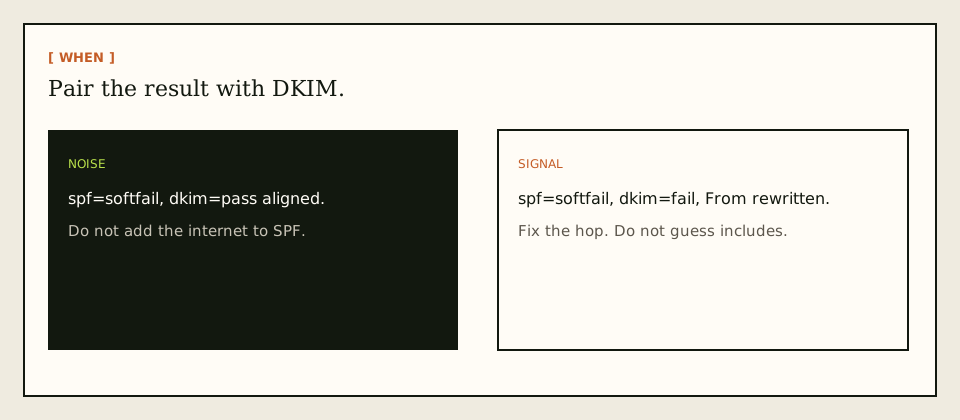
The ticket says SPF is failing. The screenshot is a yellow or red token next to a forwarded message. The operator wants to add includes until the token turns green. The decision is whether the result is hop noise or a broken identity. Softfail plus aligned DKIM is usually noise. Softfail plus a rewritten From is a product mistake. Softfail plus a destination reject is a destination policy you may not win.
| Question | If yes | If no |
|---|---|---|
| Is dkim=pass and aligned? | Softfail is usually noise. Watch the folder. | Find the body or From mutation. |
| Did the destination reject? | Read the SMTP text. Softfail may be cited. | You have a copy. Folder is a later argument. |
| Was Header From rewritten? | Stop. Restore the author. Softfail is a side effect. | Good. Keep it that way. |
| Are you editing the author’s SPF? | You probably cannot. Wrong lever. | Good. Use SRS on your hop. |
| Is this your outbound send-as? | Different ticket. Publish your SPF once. | This article is inbound forward results. |
Public checkers that evaluate your domain’s SPF against a random IP are not a test of a forwarded vendor message. The vendor’s SPF met your connecting host. Your dashboard include list does not enter that evaluation unless MAIL FROM is already your domain. Operators burn days on the wrong record.
Technical mail flow
The sender delivers to exclusive MailerZ MX. MailerZ matches the alias and forwards to Gmail or Outlook. The destination evaluates SPF on the new connection. MAIL FROM is either still the original envelope sender, or it is an SRS address on a MailerZ-controlled domain. In the first case, the author’s SPF almost never lists the forwarder, so ~all yields softfail and -all yields fail. In the second case, the hop can pass SPF as the forwarder. Alignment with Header From is a later DMARC question.
Softfail does not, by itself, fail DMARC. DMARC needs a passing SPF or DKIM result that also aligns. A softfail is not a pass, so it does not help DMARC. It also does not automatically produce dmarc=fail if DKIM already passed and aligned. That is why a yellow SPF icon and a green DMARC icon can coexist. Operators who only screenshot SPF file the wrong ticket.
Some destinations still weight SPF heavily and ignore a surviving DKIM path. Those systems can quarantine on softfail even when DMARC would pass. You will see history 250 and a junk copy, or a later bounce from the destination. That is destination policy. MailerZ cannot promise they will stop. Do not invent an inbox SLA to close the argument.
Self-send from Gmail to the same Gmail account can skip the public hop and invent a local SPF result. Probe from another provider. Unique subject. Open original. Read the tokens. Exclusive MX still matters. Softfail on a leftover-Google path is a different product’s result.
Step-by-step setup and decision path
Prove exclusive MX and a real hop
Two resolvers. History 250. Empty history is not softfail. It is mail that never arrived. Use tools if you need a second listing.
Open original, not the conversation view
Copy Authentication-Results. Write down spf, smtp.mailfrom, dkim, and dmarc. If you cannot, you do not have a softfail ticket yet.
Classify noise versus signal
Aligned DKIM plus delivered copy: document and stop. Rewritten From or broken body hash: fix the hop mutation. Destination reject citing SPF: read the full SMTP text.
Do not add includes you do not control
You cannot list the sender’s fleet in your SPF. You cannot ask every vendor to include MailerZ. SRS is the hop authorization you actually operate.
Keep Header From intact
Stamping your domain to “make SPF match” creates a new author with no DKIM. Softfail becomes a full identity break.
Separate outbound send-as
Your own
~allversus-allis a send-as policy choice. Confirm a paid plan before you debug Gmail send-as. Free has no send-as.

Failure modes and proof
| What you see | Likely cause | Proof |
|---|---|---|
| spf=softfail, dkim=pass aligned | Naive hop, surviving signature | Read dmarc=. Often pass. Stop adding includes |
| spf=fail with -all, same hop | Author publishes hard fail | Still not your SPF. Check DKIM |
| spf=softfail, From is you | Forwarder rewrote Header From | Restore the author. Do not celebrate a match |
| Destination 5xx citing SPF | Far-side policy | History plus the SMTP text. No inbox SLA |
| Checker red on your domain | Wrong object under test | You evaluated send-as DNS, not the forward |
| Empty history | Leftover MX or missing alias | Leave SPF. Fix the hop path |
Proof is the header block, the MAIL FROM domain, and the history row. A yellow icon in a mobile screenshot is not proof. Agencies run this per destination copy, not per logo. Client A’s Gmail can show softfail noise while Client B’s helpdesk rejects. Those are different far sides.
MailerZ workflow and product boundary
MailerZ is inbound MX plus authenticated SMTP. Envelope SRS only. Header From, Subject, Date, Message-ID, body, and MIME are never rewritten. That keeps DKIM survivable and makes hop softfail a classified event instead of a mystery. It is not a mailbox, not IMAP, not Workspace, not an open relay. Unhosted or unauthorized SMTP is 550 / 550 5.7.1.
History shows hops MailerZ accepted. It does not show Gmail’s folder. HOLD stores unknown local-parts on Free. It does not store a destination reject after 250. Free is one domain, ten aliases, 14-day store, send-as disabled, SMTP and API disabled. Solo is $40 per year: 5 domains, 25 aliases, 90-day store, 2,500 outgoing, 20 send-as per hour, unknowns forwarded. Starter is $8 or $80. Business is $19 or $190. Agency is $39 or $390. Unlimited is $99/month or $990/year. Confirm pricing. Limits are not an inbox-placement SLA. No SOC 2, ISO, or HIPAA claim lives here.
Features describe routing. They do not turn softfail into Primary. Paid plans do not change SPF physics. They change send-as and limits.
Cost, alternatives, and trade-offs
| Choice | What you get | What you give up |
|---|---|---|
| Classify softfail against DKIM | Fewer fake DNS emergencies | The comfort of a green SPF icon |
| Rewrite From so SPF “matches” | A hop that looks like you | The author and their signature |
| Include the whole internet | A permerror later | A record anyone can understand |
| Buy a suite to hide tokens | A store. Quote live | The Gmail archive you already have |
Time is a line item. One header read costs less than another week of includes. A From rewrite costs more than Solo when a bank starts rejecting. A Free-plan send-as argument still costs more than the upgrade. Quote vendors the day you debug. Token colors change. Softfail’s definition does not.
If every teammate needs a hosted mailbox, a suite is the honest product. A forwarder will look incomplete because it is incomplete for stored humans. Pretty SPF will not become IMAP. Open a held body for break-glass recovery and expect an audit row. That is a control, not a SOC 2 badge.
What ~all actually means on a forwarded hop
Authors choose ~all when they want receivers to note an unauthorized host without demanding a bounce. Forwarding is the textbook unauthorized host. The author’s intent was often “please still try to deliver.” Destinations that bounce on softfail are being stricter than the author asked. You can explain that. You cannot force Gmail or a bank to agree.
-all is a harder stance. The same hop becomes fail. DMARC still may pass on DKIM. Some older filters treat fail as poison regardless. If a vendor publishes -all and a destination rejects the forwarded copy, the vendor chose a policy that does not love forwarding. Your include list will not change their -all.
Neutral and none exist too. They are weaker signals. Do not spend a day “upgrading” a vendor’s policy. You do not publish their zone. You publish yours for send-as. Keep those records in different tickets and different change windows.
Lookup limits are a send-as trap. Stuffing includes to chase a forwarded softfail is how you permerror your own outbound. That story belongs in the ten-lookup article. If your own SPF is already over budget, stop adding MailerZ twice. Merge. Do not use forwarding softfail as the excuse to add another include.
How SRS changes the result
Sender Rewriting Scheme puts a forwarder-owned domain in MAIL FROM so bounces return to a host that knows the next hop, and so SPF can pass for the connecting server. MailerZ does that on the envelope only. Humans still see the original Header From. Gmail’s SPF token may turn green for the hop while DMARC still uses DKIM for alignment. That is success, not a contradiction.
Operators who expected MAIL FROM to remain the bank’s address will call SRS a rewrite and try to disable it. Disabling envelope rewrite brings the softfail back and can break bounce handling. The visible sender was never supposed to be the envelope after a responsible forward. If via bothers someone, explain the hop. Do not remove SRS to hide a label.
Bounces after SRS should come back to MailerZ, not to a bank that never heard of your Gmail destination. That is a feature. It is also why envelope and header must stay distinct in every ticket. Mixing them is how softfail becomes a three-hour call.
Fixes that make it worse
Adding the destination Gmail servers to the author’s SPF is impossible for a reason. You do not control the author, and Gmail’s outbound fleet is not your inbound forwarder anyway. Adding MailerZ to the author’s SPF only helps if MAIL FROM is already that author and they agree to publish you, which is not how random vendors work.
Publishing a second SPF record on your domain while you panic creates a permerror. Wizards love a fresh v=spf1. Merge into one string. Checking for duplicates is a different article. Mentioned here because softfail tickets are how those duplicates get born.
Rewriting Subject to add a ticket number, adding a legal footer, or re-encoding HTML to “clean” the message breaks DKIM. Then softfail has no partner pass. The copy looks worse than when you started. If you need a footer, add it when you compose as the author on a paid send-as path.
Buying a plan to “improve SPF” does nothing to a vendor’s ~all. Buy Solo when you need send-as, more aliases, or longer store. Confirm the job on pricing before you swipe.
When a destination still rejects
Some helpdesks and some banks reject on any SPF miss. History will show the far-side SMTP text. Paste that text, not the word softfail. If they require the connecting host to sit in the author’s SPF, they are asking the internet to stop forwarding. You can remap to a different destination, ask them to honor DMARC’s DKIM path, or accept that this sender and this destination are a bad pair. MailerZ will not publish a success rate to paper over that pair.
If the destination accepts and files spam, you have a reputation or filter issue, not an SPF definition issue. User marks, volume, and leftover content live there. See delivery recovery when history is 250 and the inbox is empty. Do not keep republishing MX.
Google’s people-first guidance is about pages, not SMTP; see creating helpful, reliable, people-first content. An article that says “softfail is always fine” or “softfail is always fatal” is how tickets stay religious. The honest line is: classify it, pair it with DKIM, and name the destination’s actual response.
Legal hold is not the 14-day Free store. Two-factor on the destination Gmail is still required after tokens look tidy. Agencies: one classification per zone and per destination product. A shared screenshot of one softfail does not certify the book of business.
If a second operator needs the same order without a call, send this page plus the DMARC alignment article. Softfail is the hop token. Alignment is the author token. Exclusive MX is the door. Folder is last. That order prevents the most expensive wrong fix: rewriting From so a yellow icon turns green.
Paid plans do not change the classification. Solo, Starter, Business, and Agency still see hop SPF on forwarded mail. The upgrade does not make a vendor’s ~all list your hosts. Do not buy a plan to paint a token.
IPv6 versus IPv4 on the forwarding hop does not change the meaning of softfail. The destination still asks whether this connecting address is authorized for this MAIL FROM. If you are debugging a family mismatch, resolve the MX hostname and the connecting IP in history. Do not republish SPF because one path used IPv6.
Plus-addressing and role aliases do not change SPF. hello+stripe@ still forwards as the same hop. Softfail is not a local-part problem. If the plus address never arrives, that is alias matching or HOLD, not ~all. Create the printed name. Then classify tokens on a copy that actually exists.
Shared mailboxes make screenshots lie. A teammate forwards the yellow icon from mobile and omits Authentication-Results. Ask for original. If they cannot open original, they do not have evidence. Support cannot classify a crop. The cheap artifacts are the same every time: two-resolver MX, history row, Header From, and the four authentication tokens.
Registrar included forwarding often has no SRS and rewrites From. Softfail there is paired with a broken author. Migrating that product to MailerZ is how the yellow icon becomes boring. Do not keep both MX owners while you compare tokens. Dual publish gives you two different SPF stories for the same printed address.
If counsel asks whether softfail means the message was spoofed, the honest answer is no. Softfail means this hop was not listed. Forwarding is supposed to look like that unless the envelope was rewritten. Spoofing is a different claim about Header From and missing or unaligned signatures. Do not write “spoofed” on a ticket that only shows a yellow SPF icon on a forwarded invoice.
Night-shift operators sometimes flip ~all to -all on the company domain because a forwarded vendor copy looked yellow. That change does not paint the vendor icon. It hardens your own send-as. The next morning Gmail send-as fails because a second SPF record or a missing include now permerrors. Undo the panic flip. Classify the forwarded copy. Change send-as DNS only in a named window with a third-mailbox probe.
Mobile carriers and corporate secure email gateways can add another hop after Gmail. The token you see in the app may be the gateway’s evaluation, not Gmail’s. If the company uses a re-encrypting gateway, DKIM may die there too. Say that on the ticket. MailerZ history still stops at the destination you configured. It cannot see a gateway the destination added later.
Softfail on a forwarded copy is expected when the destination evaluates the MailerZ hop against the original sender’s SPF. Envelope SRS is how MailerZ keeps that story honest. It is not a reason to add a second SPF record on your domain, and it is not an inbox-placement failure. Header From stays the original author. If that author is missing DKIM, the yellow icon can linger even when SRS is correct. Fix the sender, or accept the token. Do not dual-MX “to test.”
FAQ
What is the safest way to handle spf softfail forwarding?
Read the full Authentication-Results line, not the word softfail alone. If DKIM is pass and aligned, treat hop softfail as expected noise unless the destination rejected. Do not add every sender to your SPF. Keep Header From intact. Use exclusive MX. Probe from a third mailbox.
Does this require a new mailbox?
No. Softfail after a forward is an identifier result, not a store problem. Gmail or Outlook can stay the destination. MailerZ is not IMAP. Buy hosting only if you need folders on the domain instead of Gmail.
Will it work with Gmail or Outlook?
Both show SPF on the hop they received. A naive forward often softfails because the forwarder is not in the author’s SPF. Gmail can still file the message, especially when DKIM aligns. A pass or a softfail is not Primary. Free has no send-as.
What DNS records are involved?
The author’s SPF (~all versus -all) drives fail versus softfail when the hop is unauthorized. The forwarder’s SPF matters after SRS. DKIM and DMARC decide whether the message still authenticates as the visible sender. Exclusive MX so the hop exists. See RFC 7208.
What should I test before production?
Exclusive MX on two resolvers, a uniquely titled third-mailbox probe, Header From intact, history 250, and Authentication-Results that you can read out loud: spf, dkim, dmarc. Do not treat a public SPF checker against your domain as a test of a bank’s forwarded invoice.
Key takeaways
- SPF softfail after forwarding often means the hop was not in the author’s policy. That can be expected.
- Softfail is not reject. Pair it with DKIM and the destination’s actual response.
- Aligned DKIM plus a delivered copy is usually noise. Do not add the internet to SPF.
- SRS can pass SPF for the hop. Header From stays the person. That is the point.
- Rewriting From to hide softfail breaks the author. Do not do it.
- Empty history is leftover MX or a missing alias, not softfail.
- Free receives. Solo $40/yr starts send-as. Confirm /pricing.
- Envelope SRS only. Not IMAP, not an inbox SLA, not SOC 2.
Conclusion and next action
If a forwarded copy shows SPF softfail, read the rest of the line before you touch DNS. Keep the visible sender. Let SRS speak for the hop. Prove the message from a third mailbox. Name dkim and dmarc out loud. MailerZ can authorize the hop. It cannot list every vendor in SPF or file Primary. Start free on one domain and classify the token.
Ready to classify the hop
Start free with one domain and intact Header From.
Inbound on Free. Solo when send-as is the job. Sign in if the domain is already there.
Review quarterly, or sooner if destination SPF tokens or MailerZ SRS labels change. Author: MailerZ editorial, Secuno LLC.