What it is
- Inbox, Sent, New email in Mail Box
- Transparent forwarding
- Authenticated sending on paid plans
Open Mail Box at mail.mailerz.net. Read incoming mail, send new messages on a paid plan, and keep a Sent record. You can still forward hello@yourdomain.com to Gmail or Outlook. Envelope SRS only. Header From stays intact. Not IMAP. Not Google Workspace.
 Two-way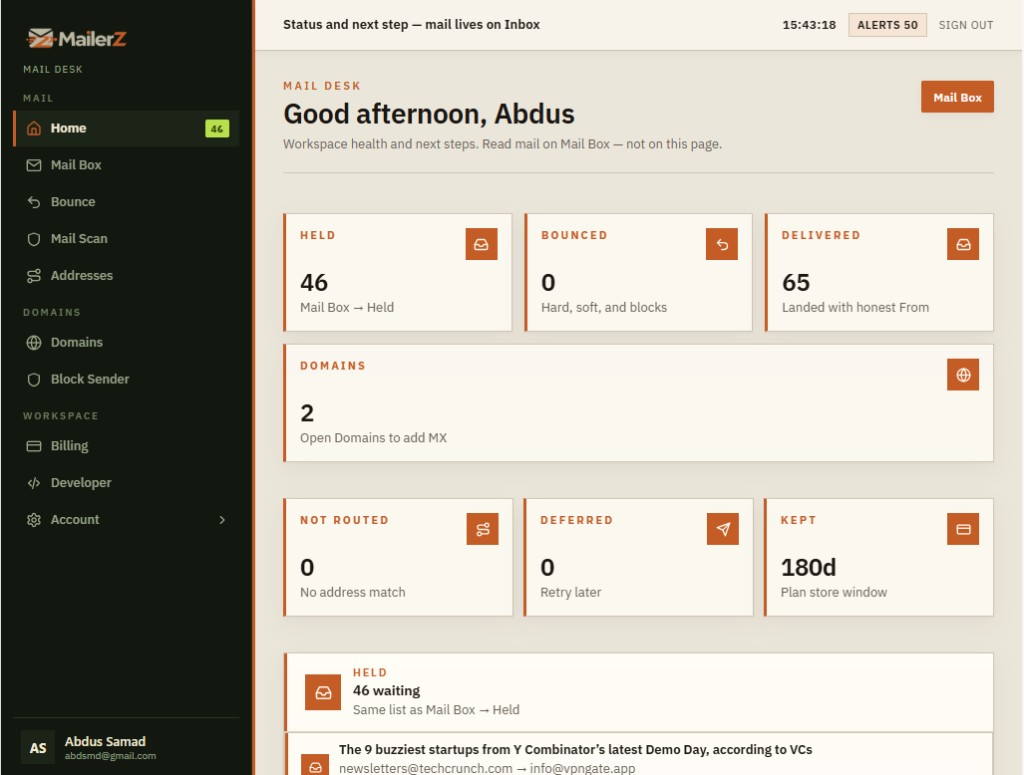
Workspace health
Mail Desk is the workspace view. Held mail waiting for a human. Delivered and bounced counts. Domains still missing MX. Not-routed and deferred traffic. The store window. When a message needs a call, you open Mail Box from here.
Open Mail DeskPlain definition
MailerZ is hosted webmail for a domain you control, operated by Secuno LLC. Mail Box has Inbox, Sent, and New email. It accepts inbound MX, can forward to Gmail or Outlook without changing Header From, and on paid plans adds portal compose, authenticated SMTP, and API sending.
Your domain’s MX points at MailerZ. Mail arrives for addresses you actually configured.
Only envelope MAIL FROM is rewritten. Visible From, subject, and body stay intact.
Open it in MailerZ, or forward to Gmail or Outlook. Paid plans add SMTP, API, and portal send.
Transparent by design
If the sender is ada@studio.com, Gmail shows ada@studio.com in the visible From field—exactly the same. MailerZ never replaces it with its own address.
Hi, I’ve attached the final project files for you.
support@yourdomain.comThanks, Ada — the files look great.
Support Teamsupport@yourdomain.com Verified sender
Thanks, Ada — the files look great.
Built-in SMTP sending
Connect MailerZ SMTP once, then reply or start new messages from your existing inbox. Your recipient sees your domain address—not Gmail, MailerZ, or a relay address.
Complete domain email delivery
MailerZ combines transparent inbound forwarding, authenticated outbound SMTP, delivery visibility, and recovery—while you keep the inbox you already use.
Use authenticated MailerZ SMTP to send new messages as hello@, support@, or any verified address—without another sending provider.
Reply from Gmail, Outlook, or another SMTP-capable inbox while recipients continue to see your professional domain address.
MailerZ handles incoming MX delivery and outgoing SMTP, so you do not need to combine a forwarder with SES, Mailgun, Postmark, or your own server.
Original From, Subject, body and attachments stay intact. Only the SMTP envelope is rewritten with SRS.
Every accepted message is stored with its delivery code and a plain-English reason—14 days on Free, 90 days on Solo through Agency, 180 days on Unlimited.
Know whether mail was forwarded, held, bounced or rejected. No more invisible forwarding failures.
Unknown addresses are held by default instead of becoming a spam cannon. You decide what gets forwarded.
MailerZ detects leftover Google, Microsoft or old-host MX records before they silently steal deliveries.
Read and send in Mail Box (Inbox, Sent, New email), or forward copies to Gmail or Outlook. You do not need IMAP or a Workspace seat.
One-time setup
MailerZ gives you the receiving and sending records, verifies the complete path, and keeps both incoming and outgoing delivery activity visible.
Set up your domainEnter a domain you control. Mail arrives in Mail Box. You can also choose a Gmail or Outlook destination for copies.
Add the MX, verification, and sender-authentication records MailerZ provides. Old or conflicting records are flagged.
Map hello@, support@, billing@, or any address to the people and inboxes that should receive them.
Add your sending identity to Gmail, Outlook, an email client, website, or app. Then reply and send as your domain.
Verify ownership
Leftovers flagged
hello@ / support@
Paid plans
Delivery observability
When someone says “I sent it,” see exactly what happened—from SMTP acceptance to the destination inbox.
250 accepted
Message secured
Header untouched
Gmail MX
250 2.0.0 OK
Fits how you already work
Work mail in Mail Box, or keep copies in Gmail and Outlook. Same domain identity either way.
Receive you@yourdomain.com in your everyday inbox, then reply and send with the same professional identity.
Route hello@, sales@, and support@ to the right people while every reply stays on-brand.
Keep client domains, aliases, delivery history, and sending identities organized in one service.
Connect forms, approved applications, or email clients to authenticated SMTP without maintaining a mail server.
The complete, leaner fit
Get domain receiving and sending without combining a basic forwarder, a separate SMTP provider, and another per-user office suite.
NoNo$0Clear capacity-based pricing
Choose by domains, aliases, seats, storage, and outbound volume. Every important limit is visible before signup.
For testing MailerZ or running one lightweight personal domain.
Included at signup
Start freeFor small teams operating several domains and shared addresses.
Billed monthly
Choose StarterFor established teams managing many domains and users.
Billed monthly
Choose BusinessFor high-volume agencies and multi-brand operations.
Billed monthly
Choose AgencyFor one person who needs more aliases, sending, and recovery.
Annual onlyBilled $40 yearly
Choose SoloFor operators who need uncapped domains, aliases, and seats.
Billed monthly
Choose UnlimitedSolo is $40/year only. Starter, Business, Agency, and Unlimited support monthly or yearly billing. Annual billing includes two months free. Every paid plan (Solo, Starter, Business, Agency, Unlimited) includes unknown mail Forward, send-as On, SMTP On, and API Enabled. Monthly outgoing and hourly send-as limits both apply on paid plans.
Clear product boundaries
Mail Box is Inbox, Sent, and New email in the portal. Forwarding, SMTP, delivery history, and recovery sit beside it. It is not IMAP or POP, not a permanent archive, and not a bulk-marketing platform.
Security by design
MailerZ accepts and sends mail only for verified domains and approved identities. Incoming messages are stored before acceptance, and delivery activity remains traceable.
Explore securityUnknown and unverified recipients receive SMTP 550.
250 is sent only after file and database storage.
Message-body access and important account actions are restricted and recorded.
SMTP credentials send only through approved domain identities—never as an open relay.
Common questions
Need a technical answer? Read our detailed guides or contact the team.
Read documentationYes. Mail Box at mail.mailerz.net is hosted webmail for your domain: Inbox, Sent, and New email, plus held and forwarded streams. It is not IMAP or POP, and it is not a Google Workspace replacement. You can still forward copies to Gmail or Outlook.
Your first domain is free
Connect your domain once. Open Inbox, Sent, and New email in Mail Box. Forward to Gmail if you want. Paid plans add SMTP and API.
Start with your domain No credit card · One domain · Mail Box + forwarding + SMTP