How to verify a domain with a TXT record is a publish-and-lookup job. MailerZ shows a hostname and a token. You put that TXT on the nameservers the internet already uses, query it in public, then let the checker read the same bytes. Verification is not MX, not SPF, and not a mailbox. Quoting mistakes are a different article.
Quick answer for domain verification txt record
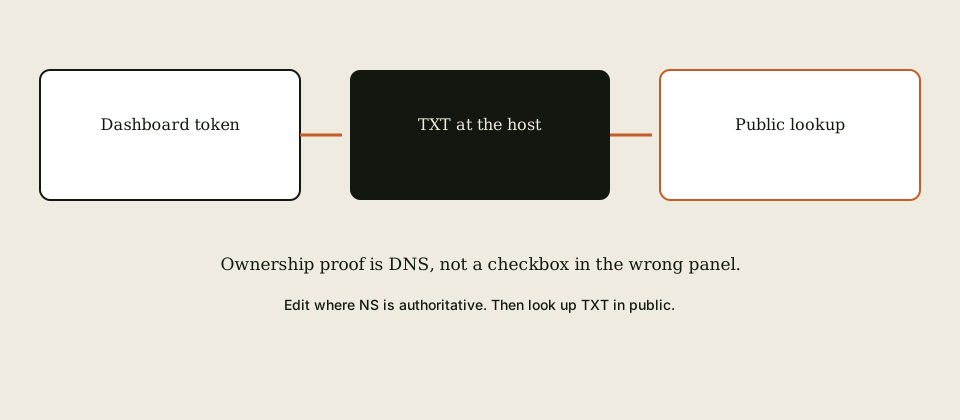
Add the domain in MailerZ. Copy the TXT name and value. Edit the zone that IETF RFC 1035 — Domain names would call authoritative. Wait until two public views show the token. Click verify. Receiving stays off until you mean to cut MX. IETF RFC 5321 — Simple Mail Transfer Protocol delivery comes after the name is yours.
This page is the order. TXT quoting, doubled hosts, and split records live next door. Do not start MX while the token is still missing in public. Do not overwrite SPF with the verify string.
MailerZ is inbound MX plus paid send-as, operated by Secuno LLC. Envelope SRS only. Header From stays intact. Not Workspace, not IMAP, not an open relay. Unauthorized send is 550 / 550 5.7.1.
Free: 1 domain, 10 aliases, 14-day store, send-as Off. Solo $40/year. Starter $8/$80. Business $19/$190. Agency $39/$390. Unlimited $99/$990. Confirm MailerZ pricing. Verify does not change those cards. Limits are not an inbox SLA.
DNS steps are in the docs. Provider-specific screens sit under docs DNS guides. Features after verify are on features.
The user problem and the decision criteria
People edit the registrar zone while Cloudflare or Route 53 actually answers. The panel looks saved. The world never sees the token. MailerZ fails verify. The ticket says “your checker is broken.”
The second mess is merging verify into SPF because both are TXT. You break outbound alignment and still fail verify. Two records, two jobs.
| Question | If yes | If no |
|---|---|---|
| Do you know which NS the public uses? | Edit that panel. | Look up NS first. Do not guess the registrar. |
| Is the host exactly what the dashboard shows? | Publish there. Often @, sometimes a label. | Do not invent _dmarc or mail. |
| Is SPF already on that name? | Add a second TXT. Do not concatenate. | Still do not put SPF syntax in the verify token. |
| Are you verifying a client zone? | Use that client’s NS. Isolate tokens. | Do not reuse last year’s token on a new domain. |
Technical mail flow
Verify is not mail flow. It is a TXT read. MailerZ asks the public DNS for a name and compares the string. TTL and cached resolvers lie for minutes to hours. Two views beat one.

After verify you still create aliases, publish one MX set, delete leftover Google or Microsoft MX, and probe from another mailbox. Send-as is later and paid. SPF, DKIM, and DMARC for sending are later too — IETF RFC 7208 — Sender Policy Framework (SPF), IETF RFC 6376 — DomainKeys Identified Mail (DKIM), IETF RFC 7489 — Domain-based Message Authentication, Reporting, and Conformance (DMARC).
Step-by-step setup and decision path
Add the domain in MailerZ
Root domain you intend to receive on. Receiving off. Copy the TXT name and value as one pair.
Find authoritative nameservers
Public NS lookup. If they say cloudflare.com, do not edit GoDaddy’s leftover zone. The docs walk common panels.
Publish one TXT
Exact host. Exact value. One record. Do not split. Do not add extra quotes if the panel already quotes. Quoting edge cases are the sibling guide.
Query in public
Two resolvers. Bytes match. If they do not, you edited theater NS or the wrong host.
Verify in the app
Let MailerZ recheck. Do not spam the button every two seconds. TTL is not a dare.
Then aliases, then MX
Named local-parts. One MX set. Leftover hosts deleted. Foreign inbound probe. Verify is not that probe.

Failure modes and proof
| Symptom | Likely cause | What to check |
|---|---|---|
| Panel saved, checker fails | Wrong nameservers. | Public NS versus the panel you edited. |
| Lookup empty | Wrong host or still propagating. | Exact name. Two resolvers. TTL. |
| Lookup has extra quotes or spaces | Panel quoting. | Sibling quoting article. Compare bytes. |
| SPF broke after verify | You overwrote SPF. | Restore SPF. Keep verify as its own TXT. |
| Old token still published | Last year’s forwarder. | Delete stale verify strings. |
| Verify green, mail missing | MX not exclusive or alias missing. | That is not a TXT problem. |
Not SOC 2. Not an inbox SLA. Security has the wording. Mailbox shows hops after mail exists — it will not verify DNS for you.
MailerZ workflow and product boundary
MailerZ must know you control the domain before it accepts mail for it. TXT is how. The product will not take MX on a name it has not verified. That is the open-relay guard starting at ownership, not only at SMTP AUTH.
- Issues a unique verification token per domain.
- Reads public DNS. Does not read your registrar screenshot.
- Unlocks alias mapping and MX instructions after green.
- Does not host IMAP. Does not rewrite Header From later.
- Does not enable send-as on Free after verify.
Cost, alternatives, and trade-offs
Verify is free on every plan. You can prove ownership on Free. You cannot send-as on Free. Do not treat a green TXT as a Solo purchase.
Suites verify domains too, with different records. If leftover Google verification TXT remains, it usually does not block MailerZ — leftover Google MX does. Clean the hop you are replacing. Do not delete every Google TXT on sight if Calendar or another product still needs it. Know the string you are removing.
Cloudflare and registrar Domain Connect helpers can write records. They still fail when they write to the wrong zone. Helpers are not a substitute for a public lookup.
Order of operations after the token is public
Agencies should keep tokens per client zone. Do not pour twenty domains into one screenshot thread. Filename the query with the zone. Offboard means delete the token you published, not only the MX.
Subdomains are separate names. Verifying example.com does not verify shop.example.com. If shop has its own MX story, it needs its own add-domain and its own TXT.
CNAME flattening and ALIAS records are not TXT. Do not CNAME the verify host to a web product. The checker wants a TXT string.
DNSSEC-signed zones still work if the TXT is valid in the signed set. A broken DS record can make the name look empty to some resolvers and present to others. If two public views disagree after TTL, inspect DNSSEC before you rewrite the token.
IPv6-only resolvers and IPv4-only office networks can disagree during a nameserver migration. That is why two views matter. Pick resolvers that are not your own recursive cache.
After green, do not celebrate by adding MailerZ MX beside leftover hosts “just for a while.” Split MX is a later incident. Save the old MX set. Cut clean. Probe. The verify step already proved ownership. The MX step proves delivery.
If you must roll back verify, delete the TXT and remove the domain in the app. Leaving a stale token published is how next year’s checker matches the wrong product.
Google Search Console TXT, Apple domain association TXT, and MailerZ verify can coexist at the apex as separate records. Hostnames must not collapse them into one value. If a panel allows only one TXT at @, you need a panel that allows multiple, or a verify host that is not @ — follow the dashboard, not a blog memory.
Time to verify is usually minutes. It is not a reason to lower every TTL on the zone. Lower TTL when you are about to cut MX, not when you are publishing a token. Mixing those jobs is how people break websites on a Friday to fix email on a Monday.
Field notes for domain verification txt record
Teams that bookmark How to Verify a Domain With a TXT Record usually arrive after a checker that stayed red while a registrar screenshot stayed green. The useful brief is still boring. Name the nameservers the public uses. Copy the dashboard host and token as one pair. Publish one TXT. Query two resolvers that are not your office cache. Then click verify. Only then talk about MX, aliases, or send-as.
MailerZ remains inbound MX plus authenticated SMTP around Gmail or Outlook. Envelope SRS only. Header From, Subject, Date, Message-ID, body, and MIME stay intact. It is Mail Box portal webmail, not IMAP, not POP, and not an open relay. Unauthorized send is 550 / 550 5.7.1. Free can verify and receive. Free cannot finish send-as: SMTP and API stay off. Solo is $40 per year when the domain From must travel. Starter is $8 or $80. Business is $19 or $190. Agency is $39 or $390. Unlimited is $99/month or $990/year. Confirm the live pricing page. Those numbers are ceilings, not an inbox-placement service-level agreement.
If leftover Google, Microsoft, Cloudflare routing, or registrar MX is still public, that is not a verify failure. That is a later delivery failure. Do not “fix” a red TXT by adding MX. Priority numbers are an order, not load balancing. Save the old MX set before you delete anything. Check more than one public view because TTL lies.
Theater nameservers are the first cause. The registrar still shows a zone editor after you delegated to Cloudflare or Route 53. You typed the token into a UI the world does not query. Public NS is the map. The panel that matches those NS is the only editor that counts. Domain Connect helpers fail the same way when they write to the leftover zone.
Quoting, doubled hosts, split values, and smart quotes from chat are the second cause. They have their own article. This page will not re-teach them. If a public lookup shows extra quotes or a truncated string, stop widening domain verification txt record as a product complaint. Fix the bytes. Then recheck.
SPF is a different TXT job. IETF RFC 7208 — Sender Policy Framework (SPF) does not want your verify token inside v=spf1. If you overwrote SPF to “make room,” restore SPF and keep verify as its own record. DKIM and DMARC are later, for sending — IETF RFC 6376 — DomainKeys Identified Mail (DKIM) and IETF RFC 7489 — Domain-based Message Authentication, Reporting, and Conformance (DMARC). Verify does not publish them for you.
Agencies should keep domain verification txt record per client zone. Isolate tokens. Filename the dig output with the zone and the date. Offboard means delete the token you published, remove the domain in the app, and stop leaving last year’s string at the apex. Agency plan capacity exists so you can hold more domains. It does not replace a named list.
Subdomains remain separate names. A marketing site on www does not verify example.com and does not verify mail.example.com. If shop has its own MX story, it needs its own add-domain and its own TXT. CNAME flattening is not a TXT. Do not point the verify host at a web product.
Catch-all forward is not a verify feature. Hold unknowns on everyday production after MX is live. Review the store. Promote a leftover only when a real person used it. Plus addressing on Gmail is not a custom-domain unknown policy. MailerZ will not strip plus tags on your domain the way Gmail does on @gmail.com.
Self-send from Gmail to the same Gmail account can short-circuit after MX is live. That green result is why people swear domain verification txt record “also proved mail” while customers vanish. Use a second provider for the inbound probe. Put a unique subject on the probe so delivery history is searchable. Verify green plus self-send green is still not a foreign hop.
Legal and security questions have published answers on the security, privacy, terms, DPA, and subprocessors pages. MailerZ is not SOC 2, not ISO 27001, and not HIPAA. The 14-day Free store, the 90-day Solo–Agency store, and the 180-day Unlimited store are recovery windows for hops this layer saw. They are not an archive and not legal hold. If counsel wants eDiscovery, buy eDiscovery.
A second worked pass: write the last change on a sticky note before you open the DNS panel. Nameserver move, leftover MX, new Domain Connect helper, contractor laptop, or a registrar forwarding toggle are the usual five. If the sticky note says nameserver move, you do not have a MailerZ checker mystery. You have theater NS. Edit the zone the public uses. Query again.
A third worked pass: print the public list of domains you intend to receive on. If you cannot print it, you are not ready for production unknowns and you are not ready for a bigger domain ceiling. Unlimited domains as marketing will not save a missing list. One verified domain on Free is enough to stop printing a personal Gmail on a homepage. Grow the list when a real zone is ready, not when a harvest guessed a hostname.
When How to Verify a Domain With a TXT Record is closed, the next physical action is a public lookup, not another settings tab. Start free on one domain you can break. Sign in if the zone already lives here. Review quarterly, or sooner after a nameserver move or a panel migration. That is how domain verification txt record stays a runbook instead of an incident.
Worked examples
The registrar still shows a zone after you pointed NS at Cloudflare. You pasted the token in GoDaddy. Public lookup is empty. MailerZ stays red. Edit Cloudflare. Query again. That is domain verification txt record, not a broken checker.
You put the token into the SPF line because the panel allowed one TXT at @. SPF broke. Verify still failed because the string was no longer the token. Restore SPF. Add a second TXT, or use the verify host the dashboard named if it is not @.
You verified example.com and expected app.example.com to receive. It does not. Add the subdomain as its own domain, publish its own TXT, then cut that name’s MX. Apex verify is not a wildcard ownership grant.
Last year’s ImprovMX or Cloudflare verify string is still published. The new MailerZ token is also published. Some checkers get confused; humans always do. Delete the stale string. Keep one product’s token. Compare Cloudflare — Email Routing documentation and ImprovMX — product documentation only as research — they do not inherit this hop.
You clicked verify every two seconds during a 300-second TTL. The checker cached empty. Wait. Query public DNS yourself. When the token is visible, recheck once. Button mashing is not a DNS strategy.
Apple, Google Search Console, and MailerZ can all ask for a TXT at the apex. They must remain separate records. If your panel collapses them, you need a panel that allows multiple TXT values, or you follow a dashboard host that is not @. Do not concatenate tokens with spaces and hope both checkers split them.
After verify, receiving is still off until you publish MX. People treat green verify as live mail and announce the address. Then leftover MX steals the first invoices. Save the old MX set. Cut exclusive MailerZ MX. Foreign-probe. Then print the address. Domain verification txt record is ownership, not a cutover.
DNSSEC-signed zones still verify if the TXT is in the signed set. A broken DS can make one resolver empty and another present. If two public views disagree after TTL, inspect DNSSEC before you rewrite the token. IPv6-only and IPv4-only paths can disagree during an NS migration. Pick resolvers that are not your office cache.
Roll back verify by deleting the TXT and removing the domain in the app. Leaving a stale token published is how next year’s checker matches the wrong product. Agencies filename the dig output with the zone and the date. One token per client zone. Do not reuse last year’s string on a new domain.
Verify does not enable send-as. Free still has SMTP Off after the name is yours. Do not announce branded replies because the checker turned green. Ownership is not delivery. Delivery is exclusive MX plus a named alias plus a foreign probe. Do those three after green, not instead of green. A green checker with leftover MX is still a split. Delete the leftover host before you print the address.
FAQ
What is the safest way to verify a domain with a TXT record?
Copy the dashboard hostname and token exactly. Publish one TXT on the name MailerZ asked for at the nameservers the public uses. Query two resolvers. Then click verify. Do not add MX until the checker is green if the product requires that order. Do not merge the token into SPF.
Does this require a new mailbox?
No. A verification TXT proves you control the name. It is not a mailbox and not IMAP. Delivery still needs aliases and exclusive MX after verify.
Will it work with Gmail or Outlook?
Verification is DNS. Gmail or Outlook as a destination comes after MX and aliases. Self-send does not verify TXT. Confirm pricing after the domain is yours.
What DNS records are involved?
The verification TXT shown in the dashboard. Hostname and one value. See RFC 1035. SPF is a different TXT. MX comes after verify. Leftover host MX is a later hard stop, not a verify trick.
What should I test before production?
Public lookup of the exact name from two resolvers. Bytes match the dashboard. Then MailerZ recheck. Then named aliases, one MX set, and a foreign inbound probe. TXT green is not live mail.
Key takeaways
- Domain verification TXT proves ownership. It is not MX and not SPF.
- Publish at the nameservers the public uses. Query two resolvers.
- One token, one TXT. Do not merge into SPF.
- Quoting and hostname typos are the sibling article.
- Green verify is not live mail. Aliases and exclusive MX come next.
- Free can verify. Free still cannot send-as.
- Subdomains need their own verify.
- Not IMAP, not SOC 2, not an inbox SLA.
Conclusion and next action
If you came here to verify a domain with a TXT record, copy the pair, edit the authoritative zone, look it up in public, then click verify. After green, map aliases and cut one MX set. That is the path. Theater panels and leftover MX are how it derails.
Next action: add one domain you can break, publish the TXT, and confirm a public lookup before you touch MX. Start free. Sign in if the zone already lives here.
Ready to prove the name
Start free with one domain and publish the TXT.
Verify first. MX second. Paid send-as only if the From must travel.
Review quarterly, or sooner if MailerZ verify hostnames or DNS panel behavior changes. Author: MailerZ editorial, Secuno LLC.