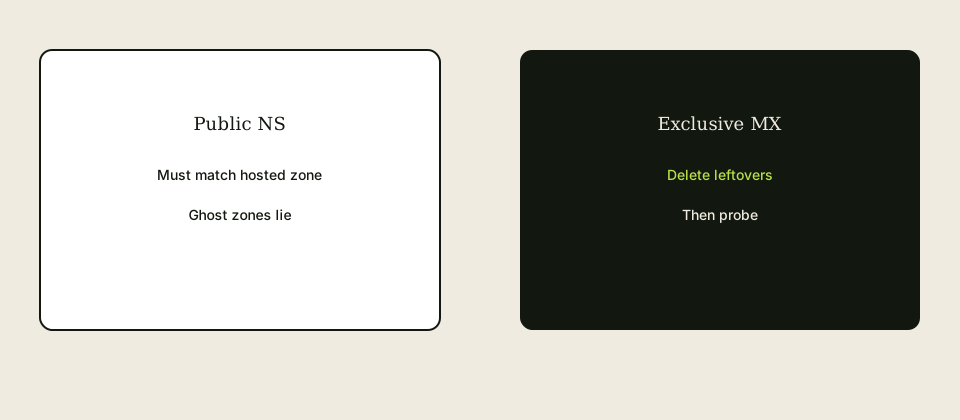
Email DNS in Amazon Route 53 means you edit the hosted zone that public NS actually name. Create MX with MailerZ values from the dashboard, a verification TXT, and sending records only if you send-as. Delete leftover MX. Route 53 will happily keep old Google MX next to new rows if you only add. Exclusive means delete. TTL wait before a cut. Do not invent hosts.
Quick answer for email dns route 53
Route 53 is a DNS host. It is not a mailbox.
RFC 1035: NS decide which hosted zone matters. A pretty zone on the wrong account is fiction.
Copy MailerZ MX from the dashboard. Do not paste a memory.
MX records in Route 53 use priority plus hostname. Formatting mistakes are a separate article.
Verification TXT is ownership, not SPF.
Start free, then publish. Probe from a third mailbox.
Authoritative mail transport is defined in IETF RFC 1035 — Domain names. Product path: docs, tools, and troubleshooting.
User problem and decision criteria
Decision criteria: is Route 53 actually authoritative, leftover rows, TTL, who has IAM.
Registrar still on old NS is the usual miss.
Two hosted zones for one name is how teams edit the ghost.
IAM that cannot change MX is a process fail, not a MailerZ fail.
Do not add a second MX “backup.”
Alias records to ELB are not email.
No inboxing from a green Route 53 console.
No SOC 2 because you used AWS.
Technical mail flow
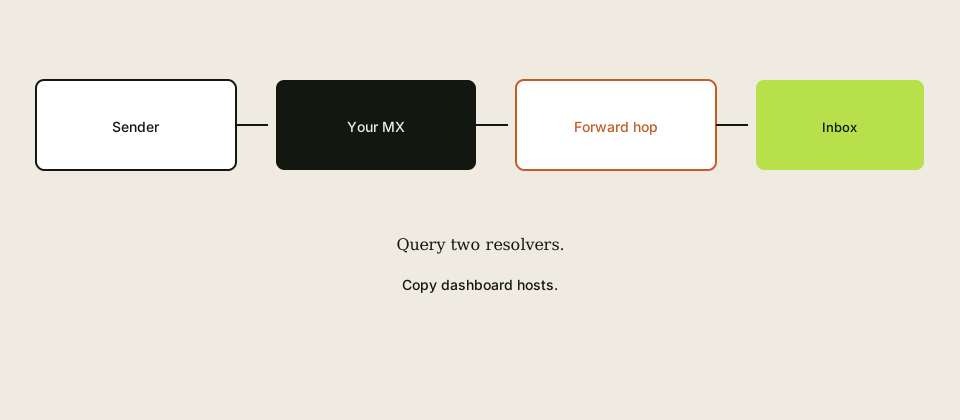
Public NS → Route 53 zone → MX → MailerZ → inbox.
If NS still point at the registrar, Route 53 edits do nothing.
TTL caches old MX.
Sending TXT records only if you send.
Two-resolver proof.
Step-by-step setup / decision path
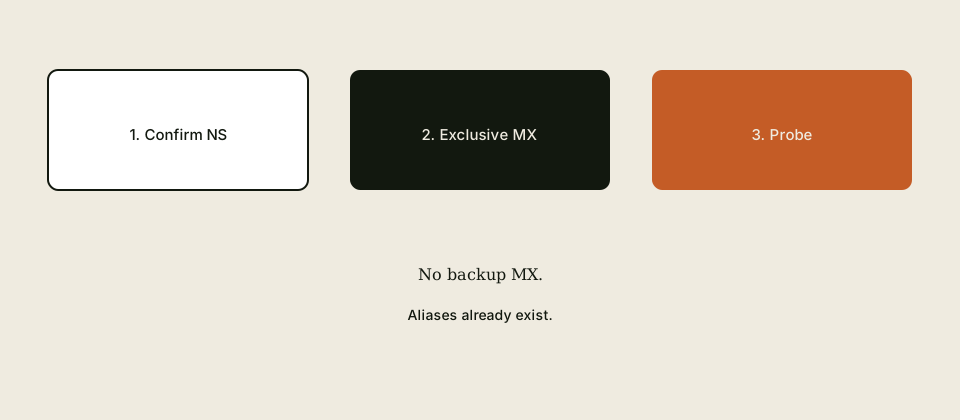
- nslookup NS. Confirm Route 53 nameservers.
- Open that hosted zone.
- Create aliases in MailerZ first.
- Upsert exclusive MX. Delete leftovers including 0 . if you meant to receive.
- Add verification TXT.
- Wait TTL if you lowered it earlier.
- Query two resolvers.
- Probe inbound.
Classify the next failure before a second DNS edit.
HOLD unknown unless you wrote a FORWARD reason.
Quote live pricing before promising alias counts.
Failure modes and proof
Edited unused zone.
Added MX, did not delete old.
Null MX left.
Registrar NS.
Invented hostname.
Self-send.
SPF as two TXT.
Alias A mistaken for MX.
IAM deny.
Dual MX.
Inboxing claim.
Cut without alias map.
MailerZ workflow and product boundary
MailerZ is custom-domain aliasing and forwarding with optional paid send-as. Secuno LLC operates mailerz.net. The app is mail.mailerz.net. Not Workspace, not IMAP, not an open relay, not a campaign ESP.
Envelope SRS only. Header From, Subject, Date, Message-ID, body, and MIME stay intact. Exclusive MX. Hold unknown on Free. Copy SMTP host, port, and TLS or STARTTLS from the dashboard when you send.
Free: one domain, ten aliases, one seat, fourteen-day store, send-as disabled, SMTP and API disabled. Solo forty dollars a year, twenty-five aliases, ninety-day store, 2,500 outgoing, 20 send-as per hour. Starter eight or eighty. Business nineteen or one hundred ninety. Agency thirty-nine or three hundred ninety. Quote pricing. No SOC 2, ISO, HIPAA, SLA, or inboxing percentage.
Cost, alternatives, and trade-offs
Editing the ghost zone costs a day.
Leftover MX costs mail.
AWS console time is cheaper than an incident.
Agencies: Route 53 access is a kickoff item.
TTL wait is calendar.
Wrong account IAM is delay.
No fake SLA.
Probe is cheap.
Operational depth
Name the AWS account in the runbook. Personal versus company accounts are how ghost zones live.
Route 53 UI shows MX as priority and value. The value is a hostname, not an IP.
Change batches can delay visibility. Query public resolvers, not only the console checkmark.
Lower TTL in the same zone you will cut, then wait.
IAM least privilege: MX and TXT, not the whole account screenshot in Slack.
If you use Route 53 Registrar plus another DNS, know which NS are public.
Delete builder MX imported during a zone transfer.
Hold unknown on the MailerZ side.
Sending records from dashboard only.
No invented 587 in Route 53. Ports are not DNS.
Re-query after delete.
Screenshot before and after.
Field notes for email DNS in Amazon Route 53
Public NS is the judge. If the domain’s nameservers are not the Route 53 delegation set you are editing, the hosted zone is a ghost. Registrar still on GoDaddy NS while you type MX in AWS is a day of “why didn’t it change.” Query NS first. Then open that hosted zone. IETF RFC 1035 — Domain names does not care about a pretty console in the wrong account.
Two hosted zones for one name exist more often than people admit. Personal AWS account versus company account. Old project versus new. Edit the one public NS name. Write the account ID in the runbook. Ghost zones are how leftovers survive a “we already fixed it.”
Copy MailerZ MX from the dashboard every time. Do not reuse last year’s hostname from memory. Route 53 wants priority plus a mail hostname, not an IP. A relative name can grow a duplicated zone suffix if you type it wrong. Open the saved row and read the fully qualified value.
Exclusive means delete other MX rows, including old Google, builder hosts, and null MX (0 and a dot) if you meant to receive. Adding MailerZ next to leftovers is a split. Demoting Google to 20 is leftover MX with extra steps. Priority is order inside one vendor set, not HA across companies.
Verification TXT is ownership. It is not SPF. One v=spf1 string if you send-as. Two SPF TXT records are a permerror. Do not let a wizard add a second. Sending records come from the dashboard when you send. Do not invent them.
Alias A records to an ELB are not MX. Do not confuse record types because the UI says alias. Email needs MX. Ports do not belong in DNS. 587 is not a Route 53 row.
IAM that cannot change MX is a process failure. Least privilege is fine. Zero ability on launch day is not. Name who can edit. Screenshot before and after. Change batches can lag. Query two public resolvers, not only the console checkmark.
Lower TTL on the MX you will swap, wait the old TTL, then cut. Lowering TTL at the moment of the cut does not clear caches. Late resolvers look like leftover MX. Dual MX is not a TTL strategy.
Create named aliases on MailerZ before you publish MX. An exclusive set with an empty map is a clean 550. HOLD unknown. Probe from a third mailbox after public resolvers agree.
If you use Route 53 as registrar and another DNS host, know which NS are public. Only one delegation is real. The unused zone can show a lovely exclusive MX and still be fiction.
SOC 2 is not conferred by AWS. MailerZ does not claim it because you used Route 53. Inboxing is not conferred by a green hosted zone. Filters live at the receiver.
Agencies: Route 53 access is a kickoff item. A client who will not give IAM cannot have you cut MX. You are writing instructions, not operating. Price that differently.
After delete, re-query. After a week, re-query. Forgotten import rows from a zone transfer come back in stories more than in physics, but people re-add “backup” Google MX. The runbook says no.
Keep website A/AAAA changes off the email change window if you can. Mixed windows make rollback stories messy. Email records are a short list. Copy them by hand from the dashboard if an export looks dirty.
Start free, map aliases, publish exclusive dashboard MX in the zone NS actually name, then probe. That is the whole Route 53 email job. Everything else is a different AWS product.
Worked scenarios for Route 53 email DNS
You edit MX in a hosted zone on a personal AWS account. Public NS still point at the company zone. Nothing changes. Two days of SPF theater. Query NS first. Open the zone those nameservers name. Write the account ID in the ticket.
You add MailerZ MX and leave Google at 10. Console looks busy. Senders split. Empty history for some. Delete Google. Do not demote to 20. Priority is not a safety net between vendors. Copy dashboard hosts only.
You type the MX value as a relative host. Route 53 appends the zone. The name becomes mx.mailerz.net.example.com. Lookups fail. Open the row. Read the FQDN. Trailing dots matter in some views. Copy from the dashboard again.
You put an IP in MX. Invalid. MX points at hostnames. A records are separate if you even need them. You do not point MX at an ELB alias because the UI said alias.
Null MX 0 . leftover from a “we do not receive mail” experiment. All inbound rejects. Remove it if you meant to receive. Then publish exclusive MailerZ MX. Probe.
Two v=spf1 TXT after a wizard. Permerror. Merge to one string from the dashboard if you send. Verification TXT is a different row. Do not confuse them.
Cut MX the minute you lower TTL. Caches still hold yesterday. Late resolvers look like leftover MX. Wait the old TTL. Then cut. Dual MX is not a way to dodge the wait.
IAM user can see the zone and cannot change records. Launch day freeze. Least privilege is fine. Name a person who can publish. Screenshot before and after. Query public resolvers, not only the console checkbox. Change batches lag.
Registrar is Route 53. DNS is Cloudflare. You edit Route 53 MX. Public NS are Cloudflare. Ghost zone. Know the delegation. Only one is real.
Zone transfer imported old builder MX. You thought the zone was clean. Two resolvers show a leftover. Delete. Re-query a week later in case someone “helps” by adding backup Google.
Aliases not created before MX. Exclusive set, empty map, clean 550s. Create hello@ first. HOLD unknown. Then publish. Then third-mailbox probe.
Agency without IAM. You write a click-path. You do not cut. You do not use the client’s root keys in Slack. Price documentation separately.
Mixed window: website A record and MX in one panic. Rollback is a novel. Split the windows if you can. Email records are a short list. Copy them by hand from the dashboard if the export looks dirty.
Someone claims AWS made email SOC 2. No. MailerZ does not claim it either. Inboxing is not a Route 53 feature. Probe the hop. Read the folder as observation. Start free, map, exclusive dashboard MX in the real zone, probe.
Practice and anti-patterns for Route 53 email DNS
Anti-pattern: editing a ghost hosted zone while public NS point elsewhere. Query NS first. Write the account ID. Two days of SPF theater is the usual cost.
Anti-pattern: add MailerZ MX, leave Google at 10 or 20. Split. Delete leftovers. Priority is not multi-vendor HA. Copy dashboard hosts every time.
Anti-pattern: relative MX hostname that becomes mx.mailerz.net.example.com. Open the saved FQDN. Trailing dots. Copy again from the dashboard.
Anti-pattern: IP in MX. Invalid. Hostnames only. Alias A to ELB is not MX.
Anti-pattern: leftover null MX 0 . All inbound rejects. Remove it if you meant to receive.
Anti-pattern: two v=spf1 after a wizard. Permerror. One string if you send. Verification TXT is a different row.
Anti-pattern: cut the minute you lower TTL. Caches remain. Wait the old TTL. Dual MX is not a cache dodge.
Anti-pattern: IAM that can look and cannot publish on launch day. Name a publisher. Screenshot before and after. Query public resolvers. Change batches lag.
Anti-pattern: Route 53 registrar plus Cloudflare NS, edits in Route 53. Ghost. Know the delegation.
Anti-pattern: zone transfer leftovers. Re-query a week later. Helpful people re-add backup Google.
Anti-pattern: MX before aliases. Clean 550s. Map first. HOLD unknown. Then exclusive MX. Then third-mailbox probe.
Anti-pattern: root keys in Slack. Agency without IAM writes a click-path and does not cut. Price documentation separately.
Anti-pattern: website A and MX in one panic window. Rollback becomes a novel. Split windows. Email is a short list. Hand-copy from the dashboard if export is dirty.
Anti-pattern: AWS therefore SOC 2, or green zone therefore inbox. Neither is true. Probe the hop. Folder is observation.
Practice: nslookup NS, open that zone, upsert exclusive MailerZ MX, delete others, verification TXT, wait TTL if you lowered it, two resolvers, probe.
Practice: start free, map aliases, publish dashboard MX in the zone the world actually queries. That is the Route 53 email job. Everything else is a different AWS product.
Operator closeout for Route 53 email DNS
Public NS is the only judge. If you are not editing the hosted zone those nameservers name, you are decorating a ghost. Personal AWS account versus company account is the usual split. Query NS. Write the account ID. Registrar still on another host means Route 53 edits do nothing. RFC 1035 does not care about a green console in the wrong place.
Copy MailerZ MX from the dashboard every cut. Hostnames, not IPs. Read the saved FQDN so a relative name did not become mx.mailerz.net.example.com. Trailing dots matter in some views. Alias A records to load balancers are not MX. Ports are not DNS rows. 587 does not live in Route 53.
Exclusive means delete other MX, including old Google, builder hosts, and null MX 0 . if you meant to receive. Adding MailerZ beside leftovers is a split. Demoting Google to 20 is leftover MX with extra steps. Priority is order inside one vendor set, not HA across companies. Two public resolvers, not only the console checkbox. Change batches lag.
Verification TXT is ownership, not SPF. One v=spf1 if you send. Two SPF TXT records are permerror. Wizards add seconds. Sending records come from the dashboard when you send. Do not invent them. Do not confuse record types because the UI said alias.
Lower TTL on the records you will swap, wait the old TTL, then cut. Lowering TTL at cut time does not clear caches. Late resolvers look like leftover MX. Dual MX is not a TTL strategy. Keep the old picture for rollback until probes pass.
Create named aliases before MX. Exclusive empty maps are clean 550s. HOLD unknown. Third-mailbox probe after public resolvers agree. Self-send is not the probe. IAM must be able to publish on launch day. Least privilege is fine. Zero ability is a process fail. Name the publisher. Screenshot before and after.
If registrar is Route 53 and DNS is Cloudflare, only one delegation is real. Edit that one. Zone transfers import leftovers. Re-query a week later. Helpful people re-add backup Google. Split website A changes from MX windows when you can. Email is a short list. Hand-copy from the dashboard if an export looks dirty.
Agencies without IAM write a click-path. They do not cut. They do not paste root keys in Slack. Price documentation separately. AWS does not confer SOC 2 on MailerZ. A green hosted zone does not confer inboxing. Probe the hop. Folder is observation.
Free: map the named aliases you will print (ten is the ceiling), HOLD a fake, publish exclusive dashboard MX in the real zone, probe. Paid send-as is a later dashboard trio, one SPF, still not a Route 53 personality. Unauthorized send remains 550. Not an open relay.
The Route 53 email job is short when NS is correct: exclusive MailerZ MX, verification TXT, optional sending records, two resolvers, probe. Everything else is a different AWS product. Start free, then publish where the world actually queries.
Handoff memo for the next operator
Route 53 setups fail when the hosted zone ID lives only in one engineer's head. Write a memo with the account, the hosted zone name, the zone ID, and whether the registrar NS records match that zone. Include the IAM principal that can change MX and TXT. If that principal is a shared root user, you have a finding. Fix it.
List the records MailerZ asked you to publish and the last date you verified them with dig. Note any extra MX or SPF you left for a migration. Extra records are the usual reason a "correct" zone still fails. The next operator should see them named, not discover them during an outage.
Record the change process: ticket, pull request if you use infrastructure as code, and the person who reviews. Console-only changes vanish from history. If you cannot say who last edited SPF, you cannot run a postmortem.
Close with the break-glass path: who can open a support case with AWS, who can unlock the registrar, and where the MailerZ workspace lives. DNS is only half the system. The next operator needs both halves on one page.
When Route 53 is the registrar but Cloudflare or another host still answers NS, every MX edit in the Route 53 hosted zone is decoration. Query NS first. If the nameservers are not the Route 53 delegation set, stop. Edit the zone the world queries, or change the registrar NS and wait. A green console in the wrong account is the usual reason “we published MailerZ MX” and mail still hits last year’s host. Two public resolvers beat the AWS checkbox. Then probe from a third mailbox.
FAQ
- What is the safest way to handle email dns route 53?
- Confirm the domain’s NS are the Route 53 delegation set. Open that hosted zone. Publish exclusive MailerZ MX and verification TXT. Delete leftovers. Query two resolvers. Probe.
- Does this require a new mailbox?
- No. MailerZ is not IMAP. Keep Gmail or Outlook unless you need a suite for other reasons.
- Will it work with Gmail or Outlook?
- Yes as destinations. Self-send is not proof. Use a third mailbox and open original.
- What DNS records are involved?
- Route 53 hosted zone: MX exclusive, verification TXT, one SPF TXT if you send. Alias A records are not MX. Do not confuse them.
- What should I test before production?
- A uniquely titled probe from an unrelated provider to each public alias. Confirm Header From and hop history.
Key takeaways
- Public NS first.
- Exclusive MX in that zone.
- Delete leftovers.
- Verification ≠ SPF.
- Copy dashboard MX.
- Two resolvers.
- Aliases before cut.
- TTL wait if you can.
Conclusion
Route 53 only helps email if it is the zone the world queries. Exclusive MX. Delete leftovers. Probe.
Start free, map aliases, then publish the dashboard MX in the hosted zone that NS actually name.