Checking SPF without creating duplicate records means you look up every TXT at the sending name, count how many start with v=spf1, and keep exactly one. A second SPF record is not a backup. Receivers treat multiple SPF records as an error. Google, Microsoft, an ESP, and MailerZ each want an include. They go in one string. They do not get their own TXT.
Quick answer for duplicate spf records
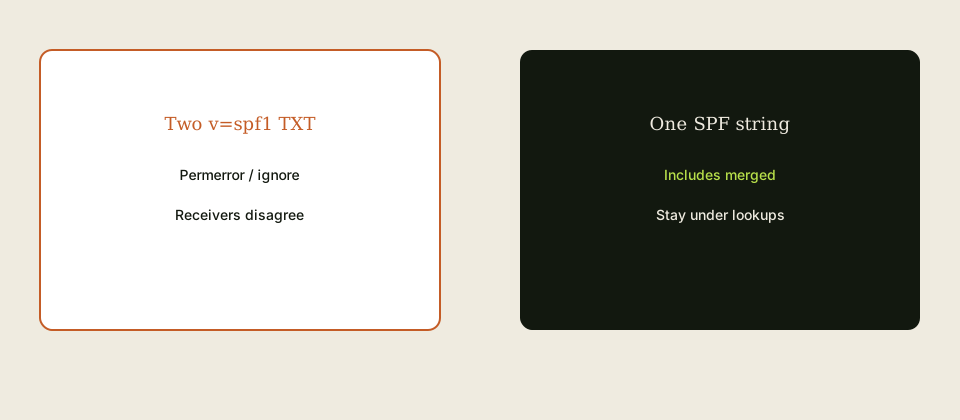
SPF authorizes which hosts may send for a domain. It lives in TXT. IETF RFC 7208 — Sender Policy Framework (SPF) says there must be at most one SPF record at that name. Two records produce permerror at many receivers. The mail may still leave your server. It will fail the check that mattered.
“Check” is a public TXT lookup, not the registrar’s list view alone. Some panels hide duplicate rows or split a long string. Count v=spf1 in the public answer. If you see two, merge. Include MailerZ’s sending mechanisms from the dashboard in that same record when you use paid send-as. Do not add a second record because the wizard said “add TXT.” See email forwarding and features.
Inbound forwarding is a different hop. MailerZ uses envelope SRS so Gmail’s SPF check on the forward hop can pass. That does not require you to publish a second SPF for every customer who mails you. Do not add random sender domains to your SPF. Troubleshooting and tools help you read what is published.
Lookup limits still apply. Too many include: mechanisms fail even when you have one record. Flatten or drop unused includes. Copy dashboard values; do not invent mechanisms from a blog.
User problem and decision criteria
The wizard problem: Google said add a TXT. Microsoft said add a TXT. Mailchimp said add a TXT. MailerZ said add the values shown. Four people clicked Add. Four v=spf1 strings. Outbound “sometimes fails.” A green checker that only reads the first record lies. A checker that reports permerror is the one to believe.
The verify-token problem: someone pastes the domain verification string into the SPF record or creates a second TXT that starts with the token and also contains v=spf1. Verification and SPF are different jobs. Keep the verify TXT. Keep one SPF.
Decision criteria: public count of v=spf1 is one; includes you still send through are present; unused suite includes are gone if you left Workspace; lookup count is safe; DKIM and DMARC match the dashboard if you send; leftover MX is a separate inbound issue.
Criteria that do not belong: a second SPF “for failover,” buying a mailbox to fix TXT, or adding the world’s banks to your SPF so forwarded inbound “authenticates.” You cannot list every sender. SRS exists for that hop.
Free MailerZ has no send-as. If you only receive, you may not need to touch SPF yet. Adding a placeholder second record “for later” is how duplicates start. When you upgrade, edit the one string.
Agencies should screenshot the public TXT set before and after. Clients will add the ESP record again next quarter. The screenshot is how you prove there was already an include.
Subdomains that send need their own SPF at that name if Envelope From uses the subdomain. Checking only the apex misses mail.brand.com. Look up the name you actually send as.
Technical mail flow
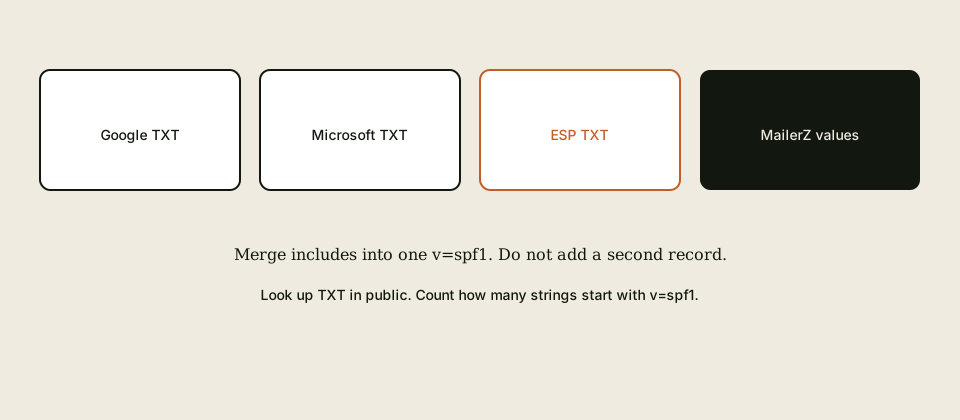
On outbound, the receiver looks up SPF for the Envelope From domain of that hop. One record is evaluated. Duplicate records end evaluation with permerror per common interpretation of IETF RFC 7208 — Sender Policy Framework (SPF). DMARC then cannot use a passing SPF alignment from that result.
DKIM is a different record type. Do not put DKIM in the SPF string. DMARC is yet another TXT, usually at _dmarc. Those are not duplicates of SPF. Duplicate means two SPF policies at the same owner name.
Inbound to your alias, then forward to Gmail, checks SPF on the forward hop against the rewritten envelope (SRS on MailerZ). Your apex SPF is not “the inbound SPF for the world.” Editing SPF will not fix leftover MX or a Header From rewrite.
include: causes more DNS lookups. The classic limit is ten. Nested includes from Google plus Microsoft plus two ESPs blow it. One record can still permerror. Checking SPF includes counting lookups, not only counting records.
Paid send-as uses dashboard host, port, and TLS or STARTTLS. Open relay is 550. Caps are 550 5.7.1. SPF does not authorize an open relay.
Step-by-step setup / decision path

- Write the exact name you send as (apex or subdomain).
- Look up TXT at that name from a public resolver. List every string.
- Count
v=spf1. If zero and you send, you will add one. If two or more, you will merge. - Collect includes you still use. Drop includes for products you left.
- If you use MailerZ paid send-as, copy the SPF mechanisms from the dashboard into this one string. Do not add a second TXT.
- Publish one record. Delete extra SPF TXT rows. Wait TTL. Look up again. Count must be one.
- Roughly count includes and nested lookups. Remove dead weight if you are near ten.
- Send a unique message to a third mailbox. Read Authentication-Results. Self-send is forbidden as proof.
- Leave verification TXT and DKIM records alone unless they are wrong. They are not SPF duplicates.
If a wizard only offers “add record,” use edit on the existing SPF instead. Teach the next person that sentence.
Keep a note of the merged string in the password manager next to DNS. The next ESP onboarding will try to add a fifth TXT.
Failure modes and proof
Two v=spf1: permerror. Proof: public TXT list.
Checker reads only the first: false green. Proof: a second checker or raw lookup.
Verify token inside SPF: broken policy. Proof: the string contents.
Too many includes: permerror with one record. Proof: lookup count.
Edited registrar while NS is Cloudflare: public still shows duplicates. Proof: NS versus panel.
Inbound-only SPF panic: you added a second record for forwarding. Proof: you do not send yet. Remove it.
Send through Gmail: SPF on Gmail hop, not your merged record. Proof: Authentication-Results.
Leftover MX blamed on SPF: wrong layer. Proof: public MX.
Self-send: hidden fail. Proof: third mailbox.
Open relay “to test SPF”: 550. Use paid auth.
MailerZ workflow and product boundary
MailerZ is custom-domain aliasing and forwarding with optional paid send-as. Secuno LLC operates mailerz.net. The app is mail.mailerz.net. Not Workspace, not IMAP, not an open relay.
Sending DNS values come from the dashboard. Merge them into one SPF. Envelope SRS inbound. Headers intact. Free: no send-as. Solo: forty dollars a year, fifteen aliases, ninety-day store, one hundred outgoing, five send-as per hour. Starter eight or eighty. Business nineteen or one hundred ninety. Agency thirty-nine or three hundred ninety. Quote pricing.
This page does not invent SOC 2, ISO, HIPAA, SLAs, or inboxing rates. RFC 7208 is the SPF rule. Dashboard values beat generic includes copied from a forum.
Cost, alternatives, and trade-offs
A permerror week costs more than fifteen minutes of TXT cleanup. Workspace seats do not merge records. An ESP onboarding that only knows “add TXT” will cost you again unless you edit.
Flattening services exist. They add operational risk if the vendor’s IPs change. For a small include list, a hand-merged record is enough.
Doing nothing leaves random outbound fails that look like “Gmail is broken.” Check the count.
Agencies should refuse to add a second SPF. That refusal is the service.
If you do not send as the domain, do not publish SPF theater. Empty or missing SPF on a receive-only domain is better than two records.
DKIM and DMARC still matter when you send. One clean SPF does not replace them. Budget the trio, not a fourth SPF.
Split-horizon DNS—internal resolvers showing one TXT set and the public internet another—is how “it looks fine in the office” survives. Always check from a resolver that is not your corporate DNS. The receiver is not on your VPN.
Quoted TXT values and concatenated 255-byte chunks can look like two records in a sloppy UI when they are one record. Raw lookup tools that show a single v=spf1 after joining are the source of truth. If the joined string still contains two v=spf1 tokens, you still have a logical duplicate even if the panel shows one row.
After a merger of two brands, both old SPF records sometimes land on the surviving apex. That is the same bug with a nicer story. Merge once. Do not keep the acquired company’s second v=spf1 as a souvenir.
One SPF TXT, one hop that sends
SPF is a single TXT record at the sending domain whose value starts with v=spf1. Two such records is a permerror. “Checking SPF” means reading the live TXT set on two resolvers and counting v=spf1 strings. If you see two, you do not add a third “to be safe.” You merge or delete until one remains. RFC 7208 is the rule. Registrar UIs that offer “add SPF” as a separate button are how duplicates appear.
MailerZ send-as uses the include the dashboard shows. Copy that include into the one SPF record. Do not leave the old forwarder’s include beside it “during migration.” Two includes for two hops is how you exceed lookup limits and permerror. Swap the include when SMTP swaps, after inbound MX is already exclusive.
Free cannot send. An SPF include for MailerZ on a Free domain does not create send-as. Unauthorized From is still 550 / 550 5.7.1. Do not publish SPF to debug empty inbound history. Empty inbound is leftover MX, HOLD, or destination refuse. SPF does not accept mail.
Duplicate looks like: one TXT that is the real policy, plus a second TXT the website builder added, plus a third the registrar wizard added. Flatten them on paper. Keep mechanisms you still use. Delete the rest. Publish one string. Query two resolvers. If they disagree, you edited the wrong nameservers.
Lookup limits: too many includes fail SPF even if you have one TXT. Do not stack Google, Microsoft, MailerZ, a CRM, and a forgotten ESP. If you need that many senders, you need an explicit inventory, not another record. Campaign mail belongs on a bulk sender with its own alignment story. MailerZ caps are 50/100/200/400/800 outgoing and 5/10/15/25 per hour. That is not a reason to keep five includes.
~all versus -all is policy tone, not a duplicate fix. Do not add a second record to “be stricter.” Change the one record after send-as is proven. Soft fail will not repair leftover MX.
DKIM and DMARC are other TXT names. They are not second SPF records. Do not paste a DKIM value into the SPF string. Do not create two DMARC records either. One name, one policy.
Apex versus subdomain: mail.example.com sending needs SPF at mail.example.com, not a second v=spf1 at the apex unless the apex also sends. Count records per DNS name you send from.
Self-send does not validate SPF the way a stranger does. Send to a mailbox you do not own. Read Authentication-Results. If you see permerror, you still have two records or too many lookups. If you see fail, the include does not match the hop that actually sent.
Header From stays intact on inbound forwards. SPF on inbound customer mail is their domain, not yours. Do not add their include to your record. You are reading the wrong conversation.
A merge worksheet and the tickets it prevents
Column A: every v=spf1 you found, including quoted fragments. Column B: who still sends with that mechanism. Column C: delete, keep, or move to the bulk sender. The surviving row becomes the one TXT. If Column B is empty, delete. Forgotten includes are how lookups die.
Website builders like to add include:_spf.google.com when you connect a form. If the form now uses MailerZ SMTP, that Google include may be leftover. If Gmail Send mail as still sends through Google, you may still need it. Name the hop that AUTHs. One hop’s include.
Route 53 and Cloudflare both make “create TXT” too easy. Two people, two clicks, two records. Lock who may edit TXT the same way you lock MX. Offboard that role.
Quoted strings that split one SPF across two TXT strings can be legal if they concatenate to one record. Two independent v=spf1 prefixes are not concatenation. They are duplicates. Read the raw set, not the pretty “email authentication” badge in the registrar.
After merge: two resolvers, one v=spf1, outbound to a third mailbox, Authentication-Results copied. Then stop. Do not “add a backup SPF.”
Inbound leftover MX plus duplicate SPF is a blended ticket. Split it. Exclusive MX first. One SPF second. The customer who “cannot email you” is usually MX. The customer who “your mail looks spoofed” may be SPF. Different objects.
Agencies: one client SPF per ticket. Do not paste a shared include pack across twenty domains. Agency 100 domains still means 100 records you can explain.
No inbox SLA after a clean SPF. Gmail still files mail. DMARC p=reject on a domain that forwards inbound is a different conversation. MailerZ does not rewrite Header From. Do not tighten DMARC to “fix” a duplicate SPF you have not merged.
Start free to prove inbound. Publish SPF when you pay for send-as and the dashboard shows the include. An SPF record on Free is not a feature unlock.
Monthly: count v=spf1 on two resolvers. The outage you avoid is a wizard’s second record the week you launched a landing page.
How operators actually find the second v=spf1
Duplicate SPF is rarely a second record you typed on purpose. It is a wizard that added Google when Microsoft already existed, a registrar “email authentication” toggle, or a copy-paste from a vendor PDF that assumed a blank zone. The check is not “does SPF exist.” The check is “how many strings in this zone start with v=spf1.” One is a policy. Two is permerror for many receivers. Three is a museum.
Query the apex and the exact name you send from if they differ. A lot of small shops send as mail.brand.com while publishing SPF only on brand.com. That is not a duplicate. That is a miss. A different shop publishes v=spf1 on both names and also on a third “spf” subdomain nobody uses. Count the records that matter for the Header From you actually send. Then count leftovers you should delete so the next intern does not include them.
Flattening is not the first fix. The first fix is one record. If you already have one record and you are over the ten-lookup budget, then you flatten or you drop an include you do not send through. Flattening a zone that still has two v=spf1 records just makes two wrong policies more compact. Compact permerror is still permerror.
Google, Microsoft, and a forwarder include can live in one record. They cannot live in three records. The include list is the map of hops that may send. If MailerZ paid send-as is the hop, include the MailerZ mechanism the dashboard shows. If you still send from Google Workspace on a different domain, that domain has its own record. Do not merge two brands into one SPF because the bookkeeper likes one TXT row.
~all versus -all is a tone, not a duplicate fix. Softfail and fail both require a single policy. People add a second v=spf1 with -all “to be strict” while leaving the old ~all record in place. Receivers that merge badly will permerror. Receivers that pick one will ignore the other. You wanted strict. You got a coin flip. Delete the extra record. Then choose ~all or -all on the one that remains.
Redirect and include are not twins. Redirect replaces the policy. Include adds a hop. A zone with redirect=_spf.vendor.example plus a leftover v=spf1 on the same name is a duplicate in spirit even if the strings look different. Pick one shape. MailerZ docs will tell you the include to add for paid sending. They will not tell you to keep the registrar’s “protect my domain” SPF that already exists.
IPv4 mechanisms for a forgotten VPS are how shops blow the lookup budget without noticing. ip4: from a 2019 Magento box still listed next to includes for Google and a newsletter tool. If that box does not send, delete the ip4. If it still sends password resets, it belongs in the one record, and you should ask why a VPS still sends when you also pay a transactional API. Two senders is a product decision. Two records is a DNS accident.
Check after every wizard, not after every quarter. Registrar mail, CDN email, and “add Google the easy way” buttons write TXT. The day you add MailerZ send-as is a wizard day. Query two public resolvers. Paste both TXT answers into the ticket. If you see two v=spf1, stop sending experiments until you have one. A test campaign during permerror trains you to blame the hop.
DKIM and DMARC do not replace SPF. They also do not excuse a second SPF. Alignment is Header From versus the authenticated domain. Envelope SRS on inbound forward is a different story. When you send as your domain through paid MailerZ SMTP, you authenticate that send. You do not add a second SPF to “cover forwarding.” Forwarding already rewrote the envelope. Cover the hop that submits SMTP.
Free cannot send. Do not publish a MailerZ include on Free because a checklist said every domain needs the vendor SPF. An include for a hop that cannot submit is noise and a future duplicate when someone adds Google later without reading. Publish sending records when send-as is on and the plan allows it. Until then, inbound MX and named aliases are the job.
Rollback for SPF is the previous single record, not “add the old one back beside the new one.” Screenshot the working TXT before you edit. If a campaign fails after a swap, restore that string. Then think. Dual SPF as rollback is how permerror lasts a week.
Product facts: one v=spf1. Envelope SRS on receive. Header From intact. Not an open relay. Start free does not include send-as. Paid plans add sending when you enable it. /pricing for caps. No invented deliverability SLA in this article. The check is a count of policies, not a vibe.
FAQ
- What is the safest way to handle duplicate spf records?
- Look up every TXT at the sending name from a public resolver. Count strings that start with v=spf1. If there are two or more, merge the mechanisms you still need into one record and delete the extras. Add MailerZ sending values from the dashboard into that same string. Do not paste a second v=spf1. Stay under the SPF DNS lookup limit. Prove outbound on a third mailbox.
- Does this require a new mailbox?
- No. Duplicate SPF is a DNS publishing error. MailerZ is not IMAP. Gmail or Outlook stays the store. A new seat does not merge TXT records.
- Will it work with Gmail or Outlook?
- Yes as destinations and as compose clients for paid send-as. SPF is checked by receivers of mail you send, not by inbound alias forwarding’s Header From. Self-send can hide a permerror. Use a third mailbox.
- What DNS records are involved?
- One SPF TXT at the name you send as, plus DKIM and DMARC as the dashboard shows if you send. Verification TXT is a different string. Do not merge the verify token into SPF. MX is inbound and does not replace SPF.
- What should I test before production?
- Public TXT lookup showing exactly one v=spf1. Then send a unique message as the domain from paid SMTP to a third mailbox and read Authentication-Results. If you are inbound-only on Free, you may not need SPF yet—do not add a second record “just in case.”
Key takeaways
- Duplicate SPF records means two or more v=spf1 TXT at the same name. That is a permerror.
- Look up TXT in public. Count. Merge includes into one string.
- Wizards that only “add TXT” cause the bug. Edit the existing record.
- MailerZ sending values go in that one string. Copy the dashboard.
- Do not add SPF for every inbound sender. SRS handles the forward hop.
- One record can still fail if includes exceed lookup limits.
- Verification TXT and DKIM are not SPF. Leave them as separate records.
- Prove outbound on a third mailbox. Self-send hides permerror.
Conclusion
Check the public count. Keep one v=spf1. Merge the includes you still use. Delete the extras. Then send a real test.
When you are ready to send as the domain, upgrade off Free and paste the dashboard SPF into that single record—not into a new one.