Gmail custom domain vs Google Workspace is a store decision, not a logo decision. You can keep the Gmail account you already search and put a domain identity in front of it. Or you can buy Workspace and let Google host the mailbox, Calendar, and Drive. Pick the object you will operate next year, then publish one MX set.

Quick answer for gmail custom domain vs google workspace
You need a Gmail custom domain when the job is a professional From and an inbox you already trust. A customer writes to hello@yourdomain.com. A delivery layer accepts MX, keeps Header From, and forwards into consumer Gmail. Paid send-as lets replies leave as the domain through authenticated SMTP. You do not need Workspace for that split. You need Workspace when the job is a hosted mailbox, admin, and the rest of the suite.
Google documents the client half of the Gmail path as “Send mail from a different address.” See Google Gmail Help — Send mail from a different address. That help page does not choose a receiving stack. It assumes you already have a working address and an SMTP server allowed to send as that address. Workspace packaging lives on the Google Workspace — product overview page and changes. Do not treat a blog number as Google’s price list.
MailerZ is one product that does the Gmail split: inbound MX plus paid send-as. It is operated by Secuno LLC. Envelope MAIL FROM can use Sender Rewriting Scheme. Header From, Subject, Date, Message-ID, body, and MIME are never rewritten. MailerZ is not Google Workspace, not IMAP, and not an open relay. Unhosted or unauthorized recipients get SMTP 550 / 550 5.7.1.
Free is one domain, three aliases, one seat, a 14-day store, send-as disabled, SMTP and API disabled, and unrouted mail held or rejected only. Solo is $40 per year only. Starter is $8 monthly or $80 yearly. Business is $19 or $190. Agency is $39 or $390. Unlimited is $99/month or $990/year. Confirm numbers on MailerZ pricing. Those are plan limits, not an inbox-placement promise.
If you only need inbound forwarding language, start with custom-domain email forwarding. If the From must travel, read send and reply as your domain. The category split against the suite is also on MailerZ vs Google Workspace.
Public threads have argued this trade for years. One Hacker News snapshot of domain forwarding, spam classification, and Workspace cost is useful as pain, not as a review: Email forwarding for your domain. Treat comments as anecdotes. Treat RFCs and provider help as the rules.
The user problem and the decision criteria
The usual quote arrives after a customer emails the domain and the founder replies from @gmail.com. Someone says “just get Workspace.” That can be right. It is expensive when the only missing object was SMTP send-as and a clean MX cutover. It is cheap when the company actually needed Drive, admin, and a hosted store.
The reverse mistake is forcing Gmail to imitate a company suite. Shared drives, device management, and legal hold do not appear because you published SPF. If IT already decided consumer Gmail is not the store, stop shopping for a forwarder.
| Question | If yes | If no |
|---|---|---|
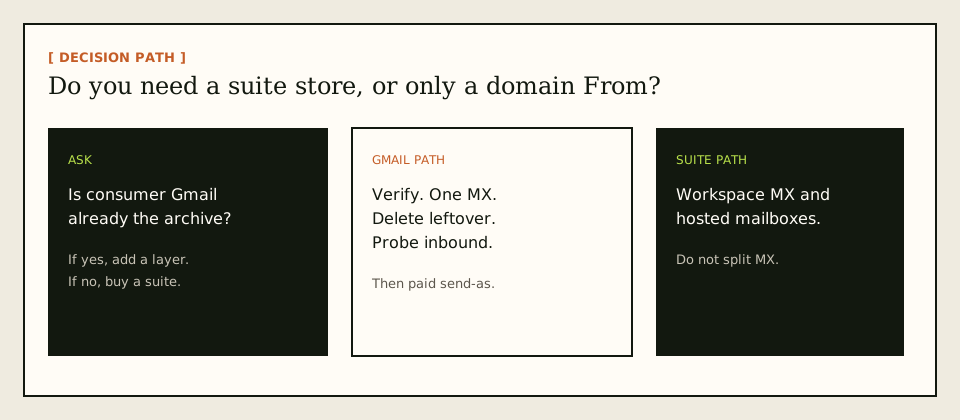
| Is consumer Gmail already the archive you will keep? | A domain layer can be enough. | You are shopping for a store, often Workspace. |
| Do you need Calendar, Drive, and vendor admin for every user? | Workspace or another suite is the product. | Do not buy seats to print a From. |
| Must recipients see the domain on replies? | You need authenticated SMTP send-as, not forwarding alone. | Inbound aliases may finish the job. |
| Will leftover Google MX stay published? | Neither path works. Delete it at cutover. | You can prove inbound honestly. |
| Is this a sales slide about looking “enterprise”? | Buy the suite if you will use it. Reject theater. | Good. Operate the smaller stack. |
IETF RFC 5321 — Simple Mail Transfer Protocol delivers to a recipient string. It does not care which retail name you bought. The receiving MX decides whether that string is a Workspace mailbox or an alias that forwards into Gmail.
Founders also confuse “Gmail” the product with “Google” the suite. Consumer Gmail is a mailbox you already have. Workspace is a paid administrative boundary around hosted users. Adding a custom domain to consumer Gmail through a delivery layer does not enroll the account in Workspace. Buying Workspace does not keep the same consumer login as the store unless you migrate. Those are different Google products that share a brand color.
Agencies add a third question: whose Workspace? A client who already pays for seats should keep them. A client who only needs hello@client.com in the agency’s Gmail does not need a seat per brand. MailerZ Agency raises domain and alias ceilings. It does not become the client’s Drive. Do not sell a suite migration to close a branding ticket.
A solo operator with one domain and three public names is the cleanest Gmail-path example. Free can prove inbound. Solo can finish send-as at $40 per year if 100 outgoing messages and 5 send-as per hour are enough. The same operator buying Workspace “to look real” pays per month for Calendar they will keep in a phone app. That can still be rational if they want Google’s admin. It is not required by SMTP.
Technical mail flow
Both paths can print hello@yourdomain.com. They do not share a mailbox.

Gmail plus a delivery layer
The sender looks up MX. MailerZ accepts for a verified domain and configured recipient. Unknown addresses on Free are held. The copy forwards to Gmail. Header From stays the original sender. Envelope return path may use SRS. Gmail can still junk the message. Delivery history records the destination SMTP response. That response is not an inbox tab.
Outbound is a second object. Free has no send-as. Paid SMTP is capped per hour and per month. You attach Gmail Send mail as to the dashboard credential. Recipients should see the domain, not a MailerZ mailbox, because MailerZ is not hosting a mailbox.
Workspace as the store
MX points at Google. Each accepted local-part is a hosted mailbox. You log into Workspace, not consumer Gmail, for that identity. Calendar and Drive come with the seat if you bought that pack. Authentication records are Google’s. If you later add a forwarder without deleting Workspace MX, senders split.
Authentication
IETF RFC 7208 — Sender Policy Framework (SPF), IETF RFC 6376 — DomainKeys Identified Mail (DKIM), and IETF RFC 7489 — Domain-based Message Authentication, Reporting, and Conformance (DMARC) evaluate the sending identity. A forwarder that rewrites Header From breaks alignment. MailerZ does not rewrite Header From. Workspace signs as the hosted domain. Mixing both outbound identities without a From selector is how replies still leave as @gmail.com.
Forwarding authentication is the quiet half of the Gmail path. After MailerZ relays into Gmail, SPF at Gmail is about the current hop and the rewritten envelope, not about whether the original sender was in your SPF. DKIM on the original message can still align if Header From and the signed bytes were not rewritten. That is why a header-preserving forward matters. It is still not an inbox-placement SLA. Gmail can accept a DMARC-pass message and hide it.
Workspace inbound is simpler to explain and heavier to run. Google accepts RCPT TO as a user it stores. There is no second hop into consumer Gmail unless you configured forwarding inside the suite, which is how people accidentally create loops and duplicate copies. If you want one store, pick one. If you forward Workspace into Gmail, you now have two archives and two junk engines.
Outlook destinations work on the MailerZ path the same way Gmail does for inbound: a verified mailbox receives the copy. Outbound Outlook uses a manual SMTP identity; interface labels vary by version. Microsoft’s device-send article is Microsoft Learn — Send email from a device or app using Microsoft 365. Workspace-for-Outlook is a different purchase (Microsoft 365). Do not mix those sentences.
Step-by-step setup and decision path
Do not buy Workspace to debug a leftover MX problem. Do not publish MailerZ MX beside Google MX “just in case.”
Write the jobs that are not email
Calendar, Drive, device management, legal hold. If those are required, you are on the suite path. If they are optional, keep going.
Name the inbox you will search next year
Consumer Gmail or a Workspace mailbox. Not both for the same public address.
If you keep Gmail, add one domain
Root domain, unique verification TXT, receiving off until the check passes. Map aliases. Complete destination verification. Do not loop a destination back to the same alias.
Publish one MX set and delete leftover records
Leftover Google MX is a hard stop. Public lookup from two resolvers. Probe from an unrelated mailbox. Self-send lies.
Add send-as only if the From must travel
Upgrade off Free. Copy SMTP values. Connect Gmail Send mail as. Send outward to a second external inbox. Field maps live in the MailerZ documentation.
If you chose Workspace, use Google’s MX and stop
Do not also point MX at a forwarder. Migrate once. Prove inbound on the suite before you print the address.
Train the From selector on week one
A correct SMTP credential still loses if compose defaults to Gmail. Set “reply from the same address the message was sent to.” Send a uniquely titled outbound probe to a second provider. Screenshot the recipient headers once. That artifact ends more arguments than another seat.
Mid-setup, people paste SPF from a blog instead of the dashboard. Do that and you authorize the wrong hop. MailerZ paid send-as shows the values to publish. Workspace shows Google’s. One set of records per sending identity. Two SPF TXT records at the same name is a failure mode, not a fallback.
Failure modes and proof
Most failures are two MX sets or a From selector that still says Gmail. Proof is a sanitized destination view plus a delivery-history row with a timestamp and remote SMTP response.
| Symptom | Likely cause | What to check |
|---|---|---|
| Some senders reach a dead Workspace trial | Leftover Google MX. | Public MX. One intended set. |
| Verification mail never arrives | Receiving off, unpublished MX, or self-send. | External probe. Dashboard verification. |
| Replies leave as @gmail.com | Free plan, no SMTP, or default identity. | From selector. Paid send-as. Reply-from-same-address. |
| Held or 550 on send | Unknown recipient, unhosted domain, unauthorized From, or plan limit. | Exact SMTP text in history. |
| Cannot log into hello@ | You created an alias and expected Workspace. | Open Gmail. There is no alias password. |
| Self-send missing | Gmail short-circuit. | Different provider. Expected. |
| History says delivered, tab empty | Gmail accepted, then filtered. | Spam and search. Not an MX rewrite. |
MailerZ does not claim SOC 2, ISO 27001, HIPAA, review counts, or an uptime SLA. Controls wording lives on Security and Trust Center.
MailerZ workflow and product boundary
MailerZ is a custom-domain email delivery layer operated by Secuno LLC. Point MX at MailerZ. Mail for a hosted, verified domain can land in Gmail or Outlook. Paid plans add authenticated SMTP so the same domain can send and reply. The live site is mailerz.net. The app is mail.mailerz.net.
Positioning for this page: keep Gmail while using professional domain email. The product appears after you admit Workspace is optional when the suite is optional.
What MailerZ does in this workflow
- Accept inbound mail for verified domains and configured recipients.
- Preserve Header From on the forward into Gmail.
- Hold or forward unknown recipients according to plan and settings.
- Store messages for 14 days on Free or 90 days on paid plans for recovery and evidence.
- Send through authenticated SMTP from approved identities on paid plans.
- Record delivery history for inbound and outbound hops.
- Surface leftover MX as a diagnostic, not as a guaranteed health score.
What MailerZ does not do
- Replace Gmail with IMAP, webmail, Calendar, or Drive.
- Rewrite header From, Subject, Date, Message-ID, body, or MIME.
- Offer send-as on Free.
- Promise inbox placement, uptime SLAs, or review counts.
- Claim SOC 2, ISO 27001, or HIPAA.
- Act as an open relay. Unauthorized send gets 550 / 550 5.7.1.
- Send newsletters, purchased lists, or cold blasts.
Seats on MailerZ are operators, not Gmail licenses. One founder can route to ten Gmail accounts. Ten Workspace seats are ten hosted stores. Do not add those columns as if they were the same unit. The ten-person cost article in this catalog works that arithmetic. This page is the object lesson: suite versus layer.
Recovery windows differ too. Free keeps 14 days of hop evidence. Paid keeps 90. Gmail keeps the mailbox you search next year. Workspace keep is a suite feature. If counsel wants seven years, you are not choosing MailerZ versus a cheaper Workspace SKU. You are choosing an archive product. Quote that boundary before a security questionnaire.
Cost, alternatives, and trade-offs
Workspace is a per-user suite cost. MailerZ is a delivery-layer cost while Gmail remains the seat you already have. Annual MailerZ cards, if still accurate: Solo $40, Starter $80, Business $190, Agency $390. Monthly Starter, Business, and Agency are $8, $19, and $39. Solo has no monthly option. Free is $0 with the limits already listed.
| Approach | You get | You give up |
|---|---|---|
| Google Workspace | Hosted mailbox, admin, often Calendar and Drive. | Per-user cost and a mailbox migration if you live in consumer Gmail. |
| Gmail plus MailerZ | Domain identity, hop evidence, paid SMTP send-as. | No hosted mailbox, published send limits, you operate DNS. |
| Inbound-only forwarder | Cheaper receiving. | Replies still leave as @gmail.com. |
| Both MX sets | A feeling of safety. | Random-looking loss. Not a fallback. |
Cloudflare Email Routing is inbound routing. It does not become MailerZ leftover-MX handling, stored failed hops, or authenticated send-as because this article mentioned it. ImprovMX is the closest commercial forwarding class; compare live plans. Microsoft 365 is another suite path if Outlook is the workplace.
Start Free to prove inbound. Pay Solo or higher when the From must travel or you need the 90-day store and more aliases. Do not start Agency because a slide said “workspace alternative.” Agency is for named domain and alias ceilings.
Time cost sits beside money. A Workspace trial that leaves MX behind is more expensive than Solo’s $40 when the leftover records eat customer mail for a month. A Gmail path that nobody tests outbound is more expensive than a suite if every reply still says gmail.com and you lose the deal. Measure the job you failed last quarter. Price that failure, then pick the stack that removes it.
Catch-all is not a Workspace substitute. Free holds unknown recipients. Paid plans can forward catch-all when you accept spam exposure. Workspace users often expect every guessed local-part to land in a mailbox. That is a policy choice, not a reason to buy seats. Name the addresses you print. Hold the rest until you have a reason.
If you already started a Workspace trial to “see the admin,” finish the trial MX cleanup even if you keep Gmail. Abandoned Google MX is the most common reason a Gmail custom-domain setup looks cursed. Diagnostics live on troubleshooting and DNS diagnostics. Those tools read public DNS. They do not invent a Workspace coupon.
FAQ
What is the safest way to handle gmail custom domain vs google workspace?
Name the store first. If consumer Gmail already holds the archive you trust, verify one domain, publish one MX set to a delivery layer, delete leftover Google MX, and prove inbound from a different mailbox before you add Send mail as. Buy Workspace when you need hosted mailboxes, admin, Calendar, and Drive. Do not run both MX sets.
Does this require a new mailbox?
A Gmail custom-domain layer does not. MailerZ is not IMAP and not webmail. Gmail stays the store. Workspace does require new hosted mailboxes because Google becomes the store.
Will it work with Gmail or Outlook?
Yes for inbound forwarding into Gmail or Outlook. Paid MailerZ send-as uses Gmail Send mail as or a manual Outlook SMTP identity. Workspace works with those clients when you connect the hosted mailbox instead of consumer Gmail.
What DNS records are involved?
A verification TXT, one MX set, leftover MX removal, and the SPF, DKIM, and DMARC values shown in the dashboard if you send as the domain. Workspace uses Google’s MX and authentication records instead. Split leftover records lose mail.
What should I test before production?
Send a uniquely titled message from an unrelated provider into the alias. Confirm Header From and delivery history. Then send outward through the custom From identity to a second external inbox. Self-send from Gmail to the same Gmail account can hide routing errors.
Key takeaways
- Gmail custom domain vs Google Workspace is a store decision.
- Keep Gmail when the archive is enough. Buy Workspace when the suite is the job.
- MailerZ is not IMAP. Gmail remains the mailbox on the layer path.
- Header From stays. Envelope SRS is the allowed rewrite.
- Leftover Google MX is a hard stop.
- Test inbound from a different mailbox. Self-send lies.
- Free has no send-as. Paid plans add SMTP within published limits.
- Delivery history is evidence. Inbox tabs are Gmail’s.
- Workspace pricing changes. Quote Google’s page, not this article.
- MailerZ is not SOC 2 and not a bulk sender. Say that in the same breath as the price.
- One MX set is the whole reliability story. A second set is not a backup.
- Send-as and inbound are separate objects. Passing one test does not prove the other.
Conclusion and next action
If you came here for gmail custom domain vs google workspace, write two lists: suite jobs and domain-identity jobs. If the first list is empty, keep Gmail and prove a delivery layer. If the first list is full, buy the suite and stop mixing MX.
MailerZ fits when you want that Gmail split with hop evidence and a recovery window you can see. It does not fit when you need a hosted mailbox for every user, a certified compliance report, or campaign-scale sending. Start on Free if you only need to watch inbound. Move to Solo or another paid plan when the From identity has to travel.
Next action: add one domain, create one alias, and send a uniquely titled message from a mailbox that is not the destination. When that lands, decide whether send-as is in scope. The register path is one domain, not a suite migration.
Ready to test both directions
Start free with one domain and prove the path.
Inbound on Free. Paid send-as when the From identity has to travel. Sign in if the domain is already there.
Review quarterly, or sooner if Gmail Send mail as, Workspace packaging, or MailerZ plan limits change. Author: MailerZ editorial, Secuno LLC.