Free vs paid email forwarding is a scope decision, not a coupon. A $0 path can prove inbound on one domain. It cannot invent send-as, a 90-day recovery window, or catch-all forwarding. The real risks sit in leftover MX, Header From rewrites, held unknown recipients, and testing the wrong hop. Price only changes which of those jobs you are allowed to finish.
Quick answer for free vs paid email forwarding
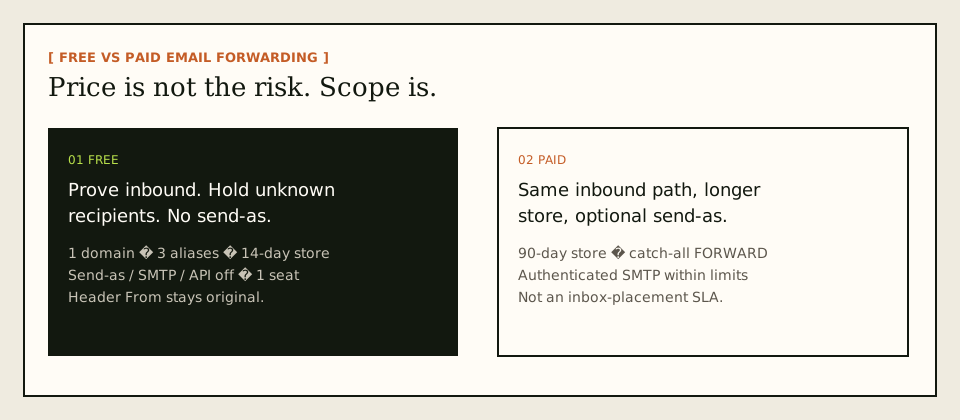
Use free email forwarding when the only job is to receive a few named aliases and watch the hop into an inbox you already trust. Use paid forwarding when the public identity has to send, when unknown recipients must forward instead of sit in a hold queue, or when a failed hop needs more than two weeks of stored evidence. On MailerZ those lines are published, not implied. Free is one domain, ten aliases, one seat, a 14-day store, send-as disabled, SMTP and API disabled. Paid plans keep the same inbound rule — envelope SRS, Header From never rewritten — and raise capacity.
People treat “free vs paid email forwarding” as if the paid SKU were a faster pipe. It is not. Internet mail still does an MX lookup, an SMTP conversation, and a destination decision. IETF RFC 5321 — Simple Mail Transfer Protocol is the transport text. Payment does not change that sequence. Payment changes whether the receiving service will authenticate an outbound session, how long it keeps a copy for recovery, and what it does with an address you never created.
The dangerous free products are not the ones that admit their limits. They are the ones that rewrite the visible From so the forward “looks local,” or that accept mail for any string at the domain without a hold. A rewrite breaks DKIM alignment against the original author domain. An unbounded catch-all turns every typo and harvested guess into a delivery. Those are policy risks. They show up on cheap plans because cheap plans optimize for “it arrived,” not for “you can explain what arrived.”
MailerZ Free is a probe, not a studio. Add the domain, publish the verification TXT and MX, delete leftover host records, map three aliases, and send a uniquely titled message from a mailbox that is not the destination. If Header From is still the original sender and delivery history shows the destination response, inbound works. If the acceptance test includes “reply as hello@yourdomain.com,” Free is the wrong plan on purpose. Solo is $40 per year. Starter is $8 monthly or $80 yearly. Business is $19 or $190. Agency is $39 or $390. Confirm the live cards on MailerZ pricing before you quote a number in a ticket.
A useful free vs paid email forwarding guide starts with jobs you can fail in public. Inbound proof is one job. Outbound identity is another. Recovery evidence is a third. Catch-all policy is a fourth. Mixing them into a single “upgrade when it feels serious” rule is how teams buy a paid plan and still leave Google MX published beside the new one.
The user problem and the decision criteria
The usual complaint is money dressed up as architecture. A founder wants hello@ and billing@ on a domain. Gmail already holds the archive. A forum thread says a free forwarder is enough. A week later customers see a “via” identity, a rewritten sender, or a bounce that names a host they never bought. The upgrade then happens under time pressure, which is the worst moment to learn that leftover MX was the actual outage.
Public self-hosting threads are useful as a catalog of pain, not as a bill of materials. One long-running example is the Reddit thread on domain forwarding setups: email forwarding on r/selfhosted. Treat comments as anecdotes. Treat RFCs and the provider’s own help pages as the rules. If a comment promises inbox rates, ignore it. No forwarder controls the destination tab.
Decide with tests, not adjectives like “professional” or “enterprise.”
| Question | If yes | If no |
|---|---|---|
| Do you only need a few named aliases into Gmail or Outlook? | A free inbound plan can be the first purchase. | Count aliases and domains before you start. Free is ten aliases and one domain. |
| Must recipients see your domain on replies and new mail? | You need paid authenticated SMTP. Free has no send-as. | Inbound forwarding may be the whole job. |
| Should unknown local parts forward or sit in a hold? | Paid catch-all FORWARD is a deliberate setting, not a default. | Free HOLD is safer while you learn the traffic. |
| Do failed hops need more than fourteen days of stored evidence? | Paid 90-day store. Free is 14 days. | Free is enough for a cutover weekend if you watch it. |
| Is the sending personal or operational, not a campaign? | Paid MailerZ SMTP is in scope within published limits. | Use a campaign platform. MailerZ is not a newsletter engine. |
| Can you delete leftover MX at cutover? | Free or paid can receive. The DNS job is the same. | Do not start. Split MX loses mail in a pattern that looks random. |
Free vs paid email forwarding setup fails when the buyer uses price as a proxy for safety. A paid plan with leftover Google MX is less safe than a free plan with one clean MX set. A free plan that rewrites Header From is less safe than a paid plan that leaves the author visible. Safety is the combination of one MX set, an honest From, a known recipient policy, and a test from a different mailbox.
MailerZ is a poor fit when every teammate needs a hosted mailbox, when you want a certified compliance report, or when you expect the vendor to promise Primary-tab placement. Those are suite and filter problems. If you want the inbound routing picture without a mailbox migration, start at custom-domain email forwarding.
Technical mail flow
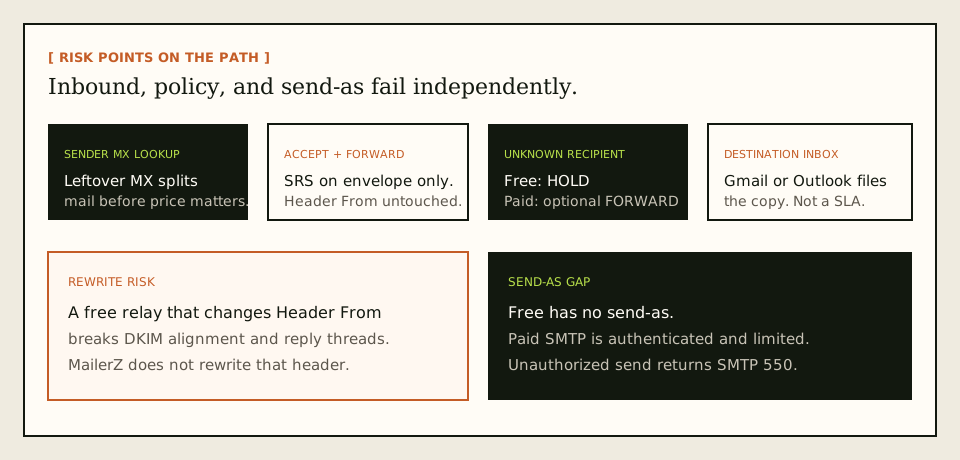
A message is not a file that “goes through forwarding.” It is a sequence of SMTP conversations. The sending server looks up MX, connects, offers a return path in MAIL FROM, names recipients in RCPT TO, and then transfers content. Envelope commands are not the header block people read in Gmail. Price does not collapse those layers.
Inbound: what free and paid share
A customer sends to hello@yourdomain.com. Their server asks DNS for MX. If MailerZ MX is the published answer, the message arrives at MailerZ. The edge checks that the domain is verified and that the recipient matches an alias, a route, or an intentional catch-all rule. MailerZ stores required content and metadata before it returns SMTP 250. Acceptance is not “Gmail already has it.” After storage, MailerZ forwards to the destination you verified.
Envelope MAIL FROM can use Sender Rewriting Scheme so bounces stay coherent. Header From is never rewritten. Subject, Date, Message-ID, body, and MIME stay as received. That rule is the same on Free and paid. If another free forwarder changes the visible From to its own domain, you are no longer comparing price. You are comparing whether the author identity survived.
SPF, DKIM, and DMARC evaluate authorization. They do not move a message into Primary. IETF RFC 7208 — Sender Policy Framework (SPF), IETF RFC 6376 — DomainKeys Identified Mail (DKIM), and IETF RFC 7489 — Domain-based Message Authentication, Reporting, and Conformance (DMARC) are the protocol documents. Alignment still depends on the visible From domain matching what those records authorize. A rewrite to the relay domain can make the forward “authenticate” as the relay and fail as the author. That is why Header From preservation is a risk control, not a slogan.
Where Free stops
Unknown addresses on Free are held. That is the safer default while you learn which strings the internet will try. Paid plans can forward unknown recipients when you enable that behavior. Holding is not a bounce and not a silent drop you can ignore forever. It is a queue with a 14-day store on Free. If you needed the typo to land in Gmail, Free will look “broken” when it is doing the documented job.
Free has no send-as. Free has no SMTP identity for Gmail. Do not paste a Free dashboard into Gmail’s Send mail as form and expect a domain From. Paid plans add authenticated SMTP from approved identities, with hourly caps: Solo 20 per hour, Starter 40, Business 60, Agency 60. Monthly outgoing ceilings rise with the plan. Unhosted or unauthorized recipients get SMTP 550. MailerZ is not an open relay.
What the destination still decides
After a successful forward, Gmail or Outlook is the system of record for the copy you read. MailerZ recovery storage is 14 days on Free and 90 days on paid plans. That store exists so a failed hop can be inspected or retried during the window. It is not a second archive and not a compliance vault. Destination spam folders, promotions tabs, and user filters remain theirs. Delivery history can say the destination accepted the message while the user still cannot see it.
Step-by-step setup and decision path
Do this in order. The most expensive free vs paid email forwarding mistake is buying a paid plan to fix a DNS problem, or staying on Free while customers expect domain-branded replies. The clicks live in the product. This section is the decision path around those clicks.
Write the jobs on one line
Example: “Receive hello@ and support@ in my Gmail. Do not catch-all. Do not send as the domain yet.” If the line includes send-as, catch-all FORWARD, more than ten aliases, or more than one domain, Free is already the wrong plan. If the line includes Calendar, Drive, and admin-managed mailboxes, you are shopping for a suite, not a forwarder.
Add one domain you control
Use the root domain, not a mailbox and not
https://. MailerZ gives a unique verification TXT. Publish it on the authoritative nameservers. Verify in the dashboard. Receiving and sending stay off until that check passes. Free and paid share this gate.Create only the aliases you can name
Map
hello@,you@, or a role address to the inbox that should receive it. Complete destination verification if asked. Do not point a destination back at the same alias. Loops look like vanished mail. Free stops at ten aliases. If you already know you need more than ten role addresses, start on Solo instead of burning a week on a ceiling you can see from the pricing page.Publish MX and delete leftover MX
Copy the exact MX hosts and priorities from the dashboard. Then read the public MX set. Old Google, Microsoft, or registrar records sitting beside MailerZ split inbound traffic. Treat leftover MX as a hard stop until those records are gone. Paying does not merge two MX sets. Query from more than one resolver if you can. Propagation is a cache problem, not a progress bar.
Prove inbound from a different mailbox
Send a uniquely titled message from an unrelated provider. Open the destination. Confirm the visible sender is the original person, not a rewritten relay identity. Open MailerZ delivery history and read the destination response. If you email yourself from the same Gmail account, Gmail can short-circuit the path and you will debug a ghost. This test is mandatory on Free and paid.
Upgrade only when a named limit blocks a named job
Need send-as? Move to Solo or higher, create the SMTP credential, and add Gmail Send mail as or Outlook’s manual SMTP identity. Need unknown recipients to forward? Enable catch-all FORWARD on a paid plan after you understand the noise. Need more than fourteen days of recovery? Paid store is 90 days. Do not upgrade “to be safe” while leftover MX is still published.
If you send, test outward to a second inbox
The outbound test must leave the client and land somewhere you can inspect headers. Check the visible From. Check that a reply returns to the alias and lands in the destination. Check MailerZ history for the outbound SMTP result. Inbox placement on the far side is still their filter.

| Record | Job | Failure if wrong |
|---|---|---|
| Verification TXT | Prove you control the zone | Receiving and sending stay disabled |
| MX | Tell the internet where to deliver the domain | Mail stays at the old host or bounces |
| SPF / DKIM / DMARC | Authorize MailerZ to send as the domain on paid plans | Receivers treat outbound as unauthenticated |
| Leftover MX removal | Stop split delivery | Some messages never reach MailerZ |
Failure modes and proof
Most “free forwarding is broken” reports are leftover MX, a Header From rewrite on another vendor, a hold queue the buyer never opened, or a send-as attempt on a plan that does not include send-as. Work the evidence.
| What you see | Likely cause | Proof to collect |
|---|---|---|
| Some senders reach the old host | Leftover MX or cached answers. Price is irrelevant. | Public MX from two resolvers. Remove obsolete records only after the intended set is live. |
| Recipient sees a relay From or via label on inbound | The forwarder rewrote Header From, or you are looking at a different tool. | Raw headers on the destination copy. MailerZ should still show the original Header From. |
| Typos never arrive in Gmail | Free HOLD, or paid catch-all still set to hold. | Hold queue and delivery history for the unknown local part. |
| Gmail Send mail as will not verify | Inbound is not proven, leftover MX stole the probe, or you are still on Free. | Plan send-as flag, public MX, history for the verification recipient, Gmail spam folder. |
| SMTP authentication failed after upgrade | Wrong username, stale password, or encryption and port mismatch. | Re-copy host, port, username, and generated password. Do not paste a Google password. |
| Self-send never appears | Gmail short-circuited a message to itself. | Repeat from a different provider. This is expected, not an outage. |
| History says delivered, user sees nothing | Destination accepted, then filtered. | Spam and promotions, destination filters, the remote SMTP response in history. |
| Held or 550 on send | Unknown recipient policy, unhosted domain, unauthorized From, or plan limit. | Exact SMTP response. Plan send-as per hour and monthly outgoing counters. |
| Recovery copy is gone after two weeks | Free store ended. That is documented, not a silent wipe. | Plan store length. Paid is 90 days. Destination archive is still the long-term store. |
Proof is a pair of artifacts: a sanitized destination header block or inbox view, and the MailerZ event with timestamp plus remote response. Do not send SMTP passwords to support. Do not publish verification tokens. If you open a body for break-glass recovery, expect an audit row. That is a control, not a marketing badge.
Inbox placement is not proof of a correct setup, and a spam folder is not proof of a broken one. Both statements can be true at once: MailerZ recorded a destination 250, and Gmail hid the message. If you need diagnostic DNS reads, use troubleshooting and DNS diagnostics. Those tools are DNS-only.
MailerZ workflow and product boundary
MailerZ is a custom-domain email delivery layer operated by Secuno LLC. Point MX at MailerZ. Mail for a hosted, verified domain can land in Gmail or Outlook. Paid plans add authenticated SMTP so the same domain can send and reply. The live site is mailerz.net. The app is mail.mailerz.net.
The product surface for inbound is documented with the rest of the MailerZ features. You are buying routing, evidence, and optional SMTP, not a mailbox seat. Recipients should see the original inbound author and, on paid send-as, the domain address you approved.
What MailerZ does on Free
- Accept inbound mail for one verified domain and up to ten aliases.
- Preserve Header From on the forward into Gmail or Outlook.
- Hold unknown recipients.
- Store messages for 14 days for recovery and evidence.
- Record delivery history for the hops it performed.
- Refuse send-as. That is a boundary, not a temporary glitch.
What paid plans add
- Solo: $40 per year, one domain, 25 aliases, one seat, 90-day store, 2,500 outgoing per month, 20 send-as per hour.
- Starter: $8 or $80, 8 domains, 50 aliases, 5 seats, 90-day store, 5,000 outgoing, 40 send-as per hour.
- Business: $19 or $190, 25 domains, 200 aliases, 25 seats, 12,000 outgoing, 60 per hour.
- Agency: $39 or $390, 100 domains, 500 aliases, 50 seats, 20,000 outgoing, 60 per hour.
- Optional catch-all FORWARD on paid plans when you enable it.
- Authenticated SMTP from approved identities. Unauthorized send gets 550 / 550 5.7.1.
What MailerZ does not do
- Replace Gmail or Outlook with IMAP or webmail.
- Rewrite header From, Subject, Date, Message-ID, body, or MIME.
- Promise inbox placement, uptime SLAs, or review counts.
- Claim SOC 2, ISO 27001, or HIPAA. Those certifications are not held. Controls live on Security and Trust Center.
- Act as an open relay.
- Send newsletters, purchased lists, or cold blasts.
Aliases are addresses and routes, not extra Gmail accounts. Catch-all is a policy. Multi-domain use is a plan-capacity question: Free is one domain. Solo is five domains. Starter, Business, and Agency raise the domain ceiling. Annual Starter, Business, and Agency billing includes two months free relative to paying monthly for a year. Solo has no monthly option.
Cost, alternatives, and trade-offs
The honest comparison is not “free versus $8.” It is inbound-only versus inbound plus send-as, fourteen days of evidence versus ninety, hold versus forward, and ten aliases versus the next ceiling. Workspace and Microsoft 365 price a suite per user. Their packaging changes on their own sites. Do not treat this article as their price list. A delivery layer stays cheap while Gmail remains the seat you already have. A suite is the right buy when the mailbox itself is the product.
| Approach | You get | You give up |
|---|---|---|
| MailerZ Free | One domain, ten aliases, inbound proof, 14-day store, Header From intact. | Send-as, catch-all FORWARD, 90-day store, extra domains. |
| MailerZ paid | Higher ceilings, 90-day store, optional catch-all FORWARD, authenticated SMTP within limits. | Still no hosted mailbox, no suite, no inbox SLA. |
| Another free inbound router | Sometimes enough if send-as is out of scope and you accept their rewrite and logging rules. | MailerZ leftover-MX handling, stored failed hops, and paid send-as do not appear because a blog mentioned the other product. |
| Hosted suite | Mailbox, admin, Calendar, vendor identity. | Per-user cost and a migration if you already live in consumer Gmail. |
Cloudflare Email Routing is inbound routing. Read their docs if that is the stack you run. It does not become MailerZ leftover-MX handling, stored failed hops, or authenticated send-as because this page named it. ImprovMX is the closest commercial class for forwarding; compare current plans on the live sites rather than memory. A best-practice free vs paid email forwarding setup is the one whose limits you can recite before MX changes.
If you already know you need send-as this week, skip Free as a production identity and use it only as a DNS rehearsal if you want the cheaper probe. Many teams verify on Free, then pay before they announce the address. That sequence is sane. Announcing the address on Free and promising branded replies is not.
FAQ
What is the safest way to handle free vs paid email forwarding?
Start on a free inbound path only if you can name the limits: ten aliases, a 14-day store, unknown recipients held, and no send-as. Prove MX, leftover cleanup, and an external inbound test first. Move to a paid plan when you need catch-all forwarding, a 90-day store, or authenticated send-as. Do not treat a $0 plan as cheaper SMTP.
Does this require a new mailbox?
No. MailerZ is Mail Box portal webmail (Inbox, Sent, New email). It is not IMAP or POP. Gmail or Outlook remains the store. Free and paid plans change capacity and send-as, not the mailbox product. Buy a suite if you need a hosted mailbox, Calendar, or Drive as the company system of record.
Will it work with Gmail or Outlook?
Yes for inbound forwarding when the destination is a mailbox you already use. Replies that must leave as the domain need paid send-as plus Gmail Send mail as or a manual Outlook SMTP identity. Free cannot finish that outbound half.
What DNS records are involved?
A verification TXT, one MailerZ MX set, and the SPF, DKIM, and DMARC values shown in the dashboard. Leftover Google, Microsoft, or host MX must be deleted at cutover. Price does not fix split MX. The same records apply on Free and paid.
What should I test before production?
Send a uniquely titled message from an unrelated mailbox into the alias. Confirm Header From and delivery history. If you will send as the domain, upgrade first, then send outward to a second external inbox. Self-send from Gmail to the same Gmail account can hide routing errors.
Does paid forwarding guarantee inbox placement?
No. Paid plans raise store length, alias and domain ceilings, and add send-as within published hourly and monthly limits. Destination filters still belong to Gmail, Outlook, or the far-side receiver. Limits are not an inbox-placement SLA.
Can I send as my domain on a free forwarding plan?
Not on MailerZ Free. Free is one domain, ten aliases, one seat, a 14-day store, send-as disabled, SMTP and API disabled, and unrouted mail held or rejected only. Solo at $40 per year is the smallest plan that adds send-as.
Key takeaways
- Free vs paid email forwarding is a scope split: inbound proof versus send-as, store length, and catch-all policy.
- MailerZ Free is one domain, ten aliases, 14-day store, send-as disabled, SMTP and API disabled.
- Header From stays the original sender on inbound. Envelope SRS is the rewrite that is allowed.
- Leftover MX is a hard stop on every plan. Paying does not merge two MX sets.
- Test inbound from a different mailbox. Self-send lies.
- Paid send-as is authenticated and limited. Unauthorized send returns 550.
- 90-day store is paid. Destination Gmail or Outlook remains the archive.
- Limits are not an inbox-placement SLA. Filters stay with the receiver.
- MailerZ is not a mailbox host, not an open relay, and not SOC 2.
Conclusion and next action
If you came here for free vs paid email forwarding, the risk is not that $0 is “less secure” in the abstract. The risk is finishing the wrong job on the wrong plan. Free can prove that MX, aliases, and Header From work. It cannot send as the domain. Paid can send, keep evidence longer, and forward unknown recipients when you ask. Neither plan fixes leftover MX, and neither plan files mail into Primary for you.
MailerZ fits when you want that split with delivery history you can read. It does not fit when you need a hosted mailbox for every user, a certified compliance report, or campaign-scale sending. Start on Free if you only need to watch inbound. Move to Solo or another paid plan when the From identity has to leave as your domain.
Next action: add one domain, create one alias, and send a uniquely titled message from a mailbox that is not the destination. When that lands, decide whether send-as, catch-all FORWARD, or a 90-day store is an actual requirement. The register path is one domain, not a suite migration.
Ready to test inbound first
Start free with one domain and prove the path.
Inbound on Free. Paid send-as when the From identity has to travel. Sign in if the domain is already there.
Review quarterly, or sooner if MailerZ plan limits, provider behavior, or DNS guidance changes. Author: MailerZ editorial, Secuno LLC.