The cheapest business email with Gmail is a split, not a discount Workspace coupon. Gmail stays the inbox you already search. A delivery layer owns MX and, if you pay, authenticated SMTP. Prove inbound on Free. Buy send-as only when the public From must leave as your domain. Do not rent a suite seat to store a backpack.

Quick answer for cheapest business email with gmail
Keep consumer Gmail as the store. Point the domain at a receiving service you control, map a few named aliases into that Gmail account, delete leftover MX, and prove inbound from a mailbox that is not Gmail. That is the cheapest business email with Gmail when the job is “customers can write to the domain.” MailerZ Free covers that job: one domain, three aliases, one seat, a 14-day store, send-as disabled, SMTP and API disabled, and unrouted mail held or rejected only.
The cheapest path that also sends as the domain is not Free. Free has no send-as. Solo is $40 per year only — 15 aliases, 90-day store, 100 outgoing per month, 5 send-as per hour, optional catch-all forward. You then attach Gmail’s Send mail as feature to MailerZ SMTP. Google documents the client clicks in Google Gmail Help — Send mail from a different address. That article does not pick a receiving stack or a price for you.
Workspace is cheaper only if you already need the suite. Hosted mail, Calendar, Drive, and admin are a per-user product. Google’s current packaging lives on the Google Workspace — product overview page and changes. Do not treat a blog number as Google’s price list. If you only need a From identity, a suite seat is the expensive way to buy SMTP.
Transport follows IETF RFC 5321 — Simple Mail Transfer Protocol. Envelope commands are not the header block Gmail shows. MailerZ may rewrite only the envelope return path with Sender Rewriting Scheme. Header From, Subject, Date, Message-ID, body, and MIME are never rewritten. If a cheap forwarder rewrites the visible From, you save money and spend it again on broken threads. Confirm plan numbers on MailerZ pricing before you quote them. Limits are not an inbox-placement promise.
Starter is $8 monthly or $80 yearly. Business is $19 or $190. Agency is $39 or $390. Those plans exist when you need more domains, seats, aliases, or send ceiling — not because Solo failed at being cheap. Annual Starter, Business, and Agency billing includes two months free relative to paying monthly for a year. Solo has no monthly option.
The user problem and the decision criteria
The usual complaint is price dressed up as email. A founder already lives in Gmail. Customers expect hello@yourdomain.com. Workspace looks like the official door. The invoice looks like rent. Forums then offer “free forwarding” that rewrites From, or a registrar mailbox that nobody opens, or a send-as toggle that never gets an SMTP server.
Cheap has to mean cheap for the job you actually have. If the job is inbound only, paying for send-as is waste. If the job is “replies show the domain,” staying on Free is not cheap — it is incomplete, and you will keep sending as @gmail.com. If the job is Calendar plus admin plus legal hold on a hosted store, a delivery layer is the wrong cheap.
Decide with criteria you can test.
| Question | Cheapest honest path | Wrong cheap |
|---|---|---|
| Must customers reach a domain address this week? | Free inbound: verify, MX, three aliases, external probe. | Buying Workspace before MX works. |
| Must recipients see the domain on replies? | Solo or another paid plan, then Gmail Send mail as. | Staying on Free and hoping Gmail invents SMTP. |
| Do you need Calendar, Drive, and admin as the company system of record? | Buy the suite. Forwarding will not become Workspace. | A $0 forwarder plus a spreadsheet calendar you already regret. |
| Can you publish DNS and delete leftover MX? | Cutover is possible on any plan. | Paying anyone while old Google MX still sits beside the new hosts. |
| Is sending personal or operational, not bulk? | Paid MailerZ SMTP is in scope. | A cheap blast tool on the same identity. MailerZ is not a campaign engine. |
Domain registration is a separate bill. Registrar prices move. Do not pretend the cheapest Gmail setup includes a free domain. Count DNS you already own as sunk, then count the delivery layer. Count Workspace only if you were going to buy the suite anyway.
Three aliases on Free is enough for many one-person brands: hello@, a personal local-part, and one role such as billing@. If the printed list is longer, that is a Solo conversation, not a reason to buy five suite seats. Role addresses are routes; see aliases and catch-all before you pay for mailboxes you will not log into.
Teammates change the arithmetic. If three people already live in Gmail and only need copies of hello@, that is destinations on one alias — or a shared mailbox you already operate — not three Workspace seats. If those three people need private stores, Calendar, and admin, you are out of the cheap-identity market. Pay for the suite and stop pretending a forwarder is HR software.
Time cost belongs on the same table as money. Leftover MX, a self-send test, and an Outlook-style “add account” wizard on a Gmail job will burn an afternoon. That afternoon is often worth more than Solo. The cheapest setup is the one you finish: one MX set, one external probe, then a deliberate yes or no on $40.
Hidden cheap is a rewriter that files every customer thread under a relay identity. Staff then spend weeks teaching people to ignore the “via” line. You did not save money. You bought a discount on trust. MailerZ’s inbound rule exists so you do not make that trade: envelope SRS only, Header From untouched.
Technical mail flow
Cheap setups fail for the same protocol reasons expensive ones fail. A sending server looks up MX, offers MAIL FROM, names RCPT TO, and transfers content. IETF RFC 5321 — Simple Mail Transfer Protocol is the transport standard. SPF, DKIM, and DMARC authorize sending; they do not file Gmail’s Primary tab. See IETF RFC 7208 — Sender Policy Framework (SPF), IETF RFC 6376 — DomainKeys Identified Mail (DKIM), and IETF RFC 7489 — Domain-based Message Authentication, Reporting, and Conformance (DMARC).
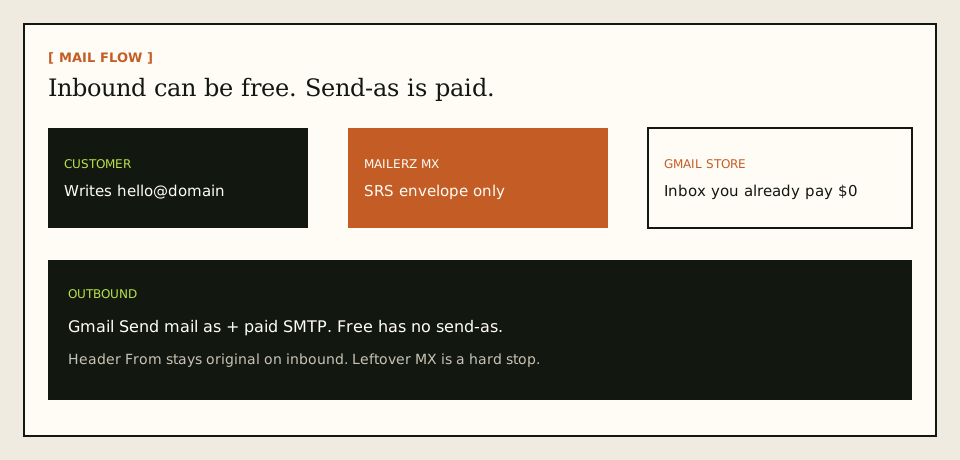
Inbound on the cheap
A customer writes to hello@yourdomain.com. MailerZ MX answers. The edge checks verification and the alias. The message is stored, then forwarded to Gmail. Header From stays the original sender. The envelope may use SRS. Delivery history records the destination response. Gmail can still hide the copy in Spam or Promotions. That is not a refund event. It is Gmail’s filter.
Unknown local-parts are held on Free. That is cheaper than catch-all noise in the same inbox you use for real work. Paid plans can forward unknown recipients when you enable that behavior. Holding unknown mail is the safer default and costs $0 extra.
Outbound when you decide to pay
Gmail Send mail as needs an SMTP server allowed to use the domain. You create a credential on a paid MailerZ plan: host, secure port, username, generated password. MailerZ authenticates, checks the From identity, applies plan limits, and submits. Unauthorized or unhosted send gets SMTP 550. MailerZ is not an open relay. The send-and-reply surface is on send and reply as your domain.
Free outgoing of 50 messages per month is not send-as. Do not plan a public From identity on that number. Solo’s 100 outgoing per month and 5 send-as per hour are published ceilings, not inbox guarantees. If you need more, read the Starter, Business, and Agency cards — still cheaper than a seat per teammate if teammates only needed aliases.
What you are not buying
You are not buying IMAP on MailerZ. You are not buying a second archive. Recovery storage is 14 days on Free and 90 days on paid plans so a failed hop can be inspected. Legal hold stays in Gmail or another archive you already run. You are not buying Primary-tab placement. Cheap and “always in Primary” are not the same sentence.
Gmail labels, filters, and vacation responders stay in Gmail. A vacation responder on Free inbound still leaves as the Gmail identity unless you also paid for send-as and told Gmail which From to use. Do not expect the $0 plan to rewrite auto-replies into the domain. That is a client setting on a paid identity.
Plus tags on your Gmail address — you+invoices@gmail.com — are a Gmail mailbox feature, not a cheaper custom domain. See Google Gmail Help — Using an address alias (plus addressing) and IETF RFC 5233 — Sieve Email Filtering: Subaddress Extension. Printing hello+vip@yourdomain.com does not create a MailerZ alias. The cheapest public string is still a named alias you actually created.
Step-by-step setup and decision path
Spend time in this order. Paying first and debugging leftover MX second is how cheap becomes two invoices and no mail.

Write the job in one sentence
“Customers can write to the domain” is Free if three aliases cover the print. “Replies show the domain” is Solo or higher. “We need Workspace admin and Drive” is a suite. If you cannot write the sentence, you will buy the loudest logo.
Add one domain you control
Root domain, not a mailbox, not
https://. Publish the verification TXT. Receiving stays off until verify passes. This step is $0 on MailerZ.Create only the aliases you will print
Map them to the Gmail account you already open. Complete destination verification if asked. Do not invent ten aliases to feel complete. Free has three. Extra names are a plan upgrade or a shorter public list.
Publish MX and delete leftover MX
Copy dashboard hosts and priorities. Remove leftover Google, Microsoft, or registrar MX. Split records waste every dollar you later spend on send-as because some senders never reach MailerZ.
Prove inbound from a different mailbox
Unique subject, unrelated provider. Confirm Header From. Confirm delivery history. Open Gmail Spam. Do not email yourself from the same Gmail account. Self-send is a free way to debug a ghost. If the probe is missing and history shows the destination said 250, the fight is inside Gmail, not inside the invoice. Paying for Workspace will not move a message Gmail already accepted and hid.
Stop if inbound was the whole job
You now have the cheapest business email with Gmail that receives. Put the address on the site. Do not upgrade because a checklist said “SMTP.”
Upgrade only for send-as
Solo at $40 per year is the usual one-person next step. Create the SMTP credential. Do not paste your Google password into that form. In Gmail: Settings → See all settings → Accounts and Import → Send mail as. Use MailerZ SMTP. Confirm Google’s verification message after it forwards.
Send to a second external inbox
Check visible From. Check that a reply returns to the alias and lands in Gmail. Check outbound history. Far-side placement is still their filter.
| Record | Job | Failure if wrong |
|---|---|---|
| Verification TXT | Prove you control the zone | Receiving and sending stay disabled |
| MX | Tell the internet where to deliver the domain | Mail stays at the old host or bounces |
| SPF / DKIM / DMARC | Authorize MailerZ to send as the domain | Receivers treat outbound as unauthenticated |
| Leftover MX removal | Stop split delivery | You paid and still miss mail |
Failure modes and proof
Cheap setups collect the same failures as expensive ones, plus one extra: people refuse to pay $40 and then call the missing From a product bug.
| What you see | Likely cause | Proof to collect |
|---|---|---|
| Google cannot verify Send mail as | Inbound is not working, leftover MX stole the message, or you are still on Free. | Public MX, delivery history, Gmail Spam, plan name. |
| Replies still leave as @gmail.com | No paid SMTP, or Gmail still uses the default identity. | From selector. Plan send-as. Outbound history. |
| SMTP authentication failed | Wrong username, stale password, port mismatch. | Re-copy dashboard values. Rotate if leaked. |
| Self-send never appears | Gmail short-circuited. | Repeat from another provider. Expected, not an outage. |
| Some senders hit last year’s host | Leftover MX or cache. | Public MX from two resolvers. |
| Fourth public address cannot be created | Free alias ceiling is three. | Upgrade or print fewer names. Not a DNS bug. |
| Held or 550 on send | Unknown policy, unauthorized From, or plan limit. | Exact SMTP response. Hourly and monthly counters. |
| “Cheap forwarder” rewrites From | You picked a rewriter, not MailerZ inbound rules. | Raw headers. Header From should stay original on MailerZ. |
Proof is a sanitized destination screenshot or header block plus the MailerZ event. Do not send SMTP passwords to support. Do not publish verification tokens. Inbox tabs are not invoices and not SLAs.
If you need DNS reads, use troubleshooting and DNS diagnostics. Those tools are DNS-only. They do not invent a cheapness score.
MailerZ workflow and product boundary
MailerZ is a custom-domain email delivery layer operated by Secuno LLC. Point MX at MailerZ. Mail for a hosted, verified domain can land in Gmail. Paid plans add authenticated SMTP. The live site is mailerz.net. The app is mail.mailerz.net.
What MailerZ does in this cheap Gmail path
- Accept inbound mail for a verified domain and configured aliases.
- Preserve Header From on the forward into Gmail.
- Hold unknown recipients on Free.
- Store messages 14 days on Free or 90 days on paid plans.
- Send through authenticated SMTP from approved identities on paid plans.
- Record delivery history for both hops.
What MailerZ does not do
- Replace Gmail with IMAP or webmail.
- Rewrite header From, Subject, Date, Message-ID, body, or MIME.
- Offer send-as on Free.
- Promise inbox placement, uptime SLAs, or review counts.
- Claim SOC 2, ISO 27001, or HIPAA. Controls live on Security and Trust Center.
- Act as an open relay. Unauthorized send gets 550 / 550 5.7.1.
- Send newsletters or purchased lists.
- Match Google Workspace pricing. Google publishes its own cards.
Free is one domain. Solo is three domains. Starter, Business, and Agency raise domain, alias, seat, and send ceilings. Cheap for one brand is not cheap for an agency with a hundred domains — that is why Agency exists.
Seats on paid MailerZ plans are people who can operate the delivery layer, not extra Gmail logins. A Business plan with 25 seats does not mint 25 hosted mailboxes. It raises how many operators can share the dashboard while Gmail remains the store. If you need 25 hosted mailboxes, you are back in suite territory. Quote that difference before someone maps “seat” to “inbox” on a finance spreadsheet. A seat that cannot open IMAP is not a missing feature. It is the product boundary that keeps the cheap Gmail path cheap.
Cost, alternatives, and trade-offs
Put the bills on one table. Domain registrar: whatever you already pay. Gmail consumer: $0 for the store you already use. MailerZ Free: $0 to prove inbound. MailerZ Solo: $40 per year when send-as is required. Workspace: per user, current card on Google’s site, plus migration if you leave consumer Gmail. Microsoft 365: same shape, different vendor.
| Approach | You pay | You give up |
|---|---|---|
| Gmail + MailerZ Free | $0 on MailerZ. Registrar separate. | No send-as. Three aliases. 14-day store. Unknown held. |
| Gmail + MailerZ Solo | $40 per year. | No suite. Published send limits. You operate DNS. |
| Gmail + Starter / Business / Agency | $8/$80, $19/$190, or $39/$390 as published. | Still not Workspace. Still not IMAP. |
| Google Workspace | Per-user suite price Google publishes. | You migrate the store if you already live in consumer Gmail. |
| Inbound-only rewriter | Often $0. | Broken From, worse filters, two vendors if you add SMTP later. |
Cloudflare Email Routing is inbound routing. It does not become MailerZ leftover-MX handling, stored failed hops, or authenticated send-as because it is free. ImprovMX is the closest commercial forwarding class; compare live plans, not memory. Neither vendor’s price is a MailerZ claim.
Two months free on annual Starter, Business, and Agency is arithmetic against monthly, not a coupon stacked on Solo. Solo has no monthly option. If cash-flow wants monthly, Starter at $8 is the published door, not a shadow Solo.
The cheapest setup that fails leftover MX is the most expensive week you will have. Delete the old hosts. Probe from another mailbox. Then decide whether $40 is due.
Agencies sometimes try to stack Free on every client domain. Free is one domain. Client work that needs many zones is an Agency-capacity question, not a loophole. Cheap for your own brand is Solo or Free. Cheap for a roster of customer domains is the published Agency card, not twenty Free accounts and leftover MX on each.
Campaign mail is never the cheap add-on on this identity. Purchased lists, cold blasts, and newsletter engines belong on a platform built for that job. Putting that traffic on MailerZ SMTP burns the same domain you just made look professional. Unauthorized or unhosted send still gets 550. That refusal is cheaper than a burned domain.
FAQ
What is the safest way to handle cheapest business email with gmail?
Keep Gmail as the store. Add one verified domain, publish one MX set, delete leftover host records, and prove inbound from a different mailbox on Free. Pay for send-as only when recipients must see the domain on replies. Do not buy a suite seat to solve an identity job.
Does this require a new mailbox?
No. MailerZ is not IMAP and not webmail. Gmail remains the archive. A new mailbox is only required if you buy Workspace or another host because you need the suite, not because you need a From address.
Will it work with Gmail or Outlook?
Yes for inbound when the destination is a verified mailbox. This article is the Gmail path: Settings → Accounts and Import → Send mail as on a paid plan. Outlook can be a destination too, with a manual SMTP identity. Interface labels vary by Outlook version.
What DNS records are involved?
A verification TXT, one MailerZ MX set, leftover MX removal, and the SPF, DKIM, and DMARC values shown in the dashboard if you also send as the domain. Gmail does not need its own MX on your custom domain for this split.
What should I test before production?
Send a uniquely titled message from an unrelated provider into the alias. Confirm Header From and delivery history. Then, on a paid plan, send outward through Gmail Send mail as to a second external inbox. Self-send from Gmail to the same Gmail account can hide routing errors.
Key takeaways
- The cheapest business email with Gmail keeps Gmail as the store and pays only for the identity job you have.
- Free proves inbound: one domain, three aliases, unknown held, no send-as.
- Solo is $40 per year when replies must show the domain. Free cannot finish that half.
- Workspace is cheaper only if you need the suite. Do not quote a blog as Google’s price list.
- Header From stays original on inbound. Envelope SRS is the allowed rewrite.
- Leftover MX wastes cheap and paid setups alike.
- Test inbound from a different mailbox. Gmail self-send lies.
- Plan limits are not inbox-placement SLAs. MailerZ is not SOC 2.
- Do not buy campaign sending on this identity. Use a campaign platform.
Conclusion and next action
If you came here for the cheapest way to use a business email address with Gmail, the path is sequential. Keep the inbox. Verify the domain. Publish one MX set. Delete leftover hosts. Prove inbound on Free. Pay Solo or another published plan only when the From identity has to travel. Buy Workspace when you need Workspace, not when you need a stamp.
MailerZ fits that split with delivery history and a recovery window you can see. It does not fit hosted mailboxes for every user, certified compliance reports, or bulk sending. Start on Free if receiving is the job. Move to Solo when the public reply must say your domain.
Next action: add one domain, create one alias into the Gmail you already open, and send a uniquely titled message from a mailbox that is not that Gmail. When that lands, decide whether $40 is due. If the hop fails, fix MX and leftover records before you open the paid card. The register path is one domain, not a suite migration.
Prove inbound before you pay
Start free with one domain and test the path.
Inbound on Free. Paid send-as when the From identity has to travel. Sign in if the domain is already there.
Review quarterly, or sooner if MailerZ plan limits, Gmail Send mail as, or Google Workspace packaging changes. Author: MailerZ editorial, Secuno LLC.