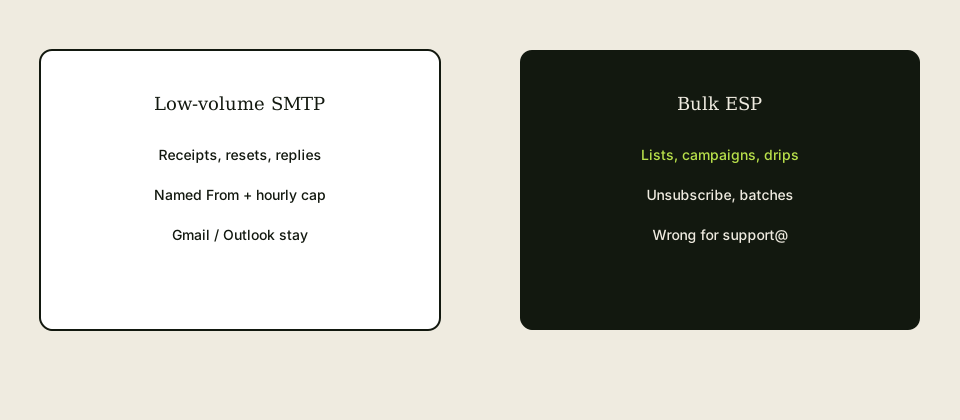
A low volume SMTP service is the right tool when the job is a receipt, a password reset, or a human reply as a named domain From. A bulk ESP is the right tool when the job is a list, a campaign, and an unsubscribe link. Mixing those jobs is how teams hit hourly caps, skip consent, and still fail DMARC. MailerZ is the first kind. It is not the second.
Quick answer for low volume smtp service
Operational mail is one-to-one or one-to-few. Someone checked out. Someone clicked reset. Someone wrote support@ and you reply as that role. IETF RFC 5321 — Simple Mail Transfer Protocol still carries the envelope. You want authenticated SMTP from a verified domain identity, a From that is also a named inbound alias, and a destination inbox people already open. You do not want a campaign UI, a segment builder, or a promise of millions of sends.
Bulk ESPs exist because list mail is a different reputation game. They throttle by engagement, require unsubscribe, and expect you to warm a stream. Putting password resets on that stream mixes transactional trust with newsletter complaints. Putting a 4,000-person launch on MailerZ send-as mixes a reply product with a blast. Solo allows 20 send-as messages per hour. That is a feature, not a bug. See send and reply and pricing.
MailerZ Free cannot send-as: one domain, ten aliases, one seat, fourteen-day store, send-as disabled, hold unknown. Paid send-as copies host, port, and TLS or STARTTLS from the dashboard. Do not invent ports from an ESP setup wizard. Open-relay attempts get 550. Disallowed authenticated traffic gets 550 5.7.1. Features and docs describe the product as forwarding plus optional SMTP, not as a list platform.
Use both products when you have both jobs. Receipts on SMTP. Weekly email on an ESP. Same visible domain is fine if DNS and From alignment are honest on each path. One password pasted into both is how a leaked plugin burns the reply identity.
User problem and decision criteria
Founders hear “you need SendGrid or Mailgun to look professional.” They create an ESP account, verify the domain, and then try to reply to customers from the ESP dashboard. Threads die. Agents live in Gmail. The ESP was never a shared inbox. Or they do the reverse: they find MailerZ SMTP and import a CSV of 8,000 emails. The hourly cap stops them. They call it downtime. It is a category error.
Decide with five questions. First: will a human reasonably reply to this message? If yes, you need a named alias and a low-volume SMTP From, not a campaign. Second: is there a list and a one-to-many intent? If yes, you need an ESP and consent records. Third: does volume fit an hourly cap you can quote? Solo is 20 send-as per hour and 2,500 outgoing per month. A busy shop on a sale day may need a higher plan or an ESP split. Fourth: where do people read mail today? If the answer is Gmail, do not force them into an ESP inbox. Fifth: can you copy dashboard SMTP values, or will you paste a blog’s 587?
Criteria that matter: named From, inbound proof, leftover MX gone, sending DNS from the dashboard, client or plugin that authenticates, hourly and monthly caps in writing, a place for replies. Criteria that do not: “unlimited transactional,” inboxing percentages, review-count badges, or SOC 2 language this site does not claim.
WordPress forms, Stripe receipts you compose yourself, and Gmail Send mail as are operational. Abandoned-cart series, webinar sequences, and “we miss you” mail are ESP work. If a tool can do both, you still split credentials and streams so a complaint on the newsletter does not automatically explain a failed reset. Receivers do not owe you that nuance.
Agencies inherit clients who “already have Mailchimp” and still need billing@ to send invoices. Keep Mailchimp. Add SMTP for the invoice From. Do not migrate the list onto MailerZ. Do not migrate support onto Mailchimp. Two invoices, two jobs, one domain if DNS is clean.
Compliance tone: operational mail still needs honesty about who you are. It is not a license to skip a physical address on marketing. This article is not legal advice. It is a routing article. If counsel says a message is marketing, use the ESP’s unsubscribe. Do not invent a list on SMTP because the cap looked cheaper.
Shared SMTP passwords in Slack turn a low-volume service into a shared megaphone. When a contractor leaves, rotate. ESP API keys and SMTP secrets are different objects. Rotate both if someone had both. Low volume does not mean low sensitivity. Password-reset mail is more sensitive than a newsletter.
Technical mail flow
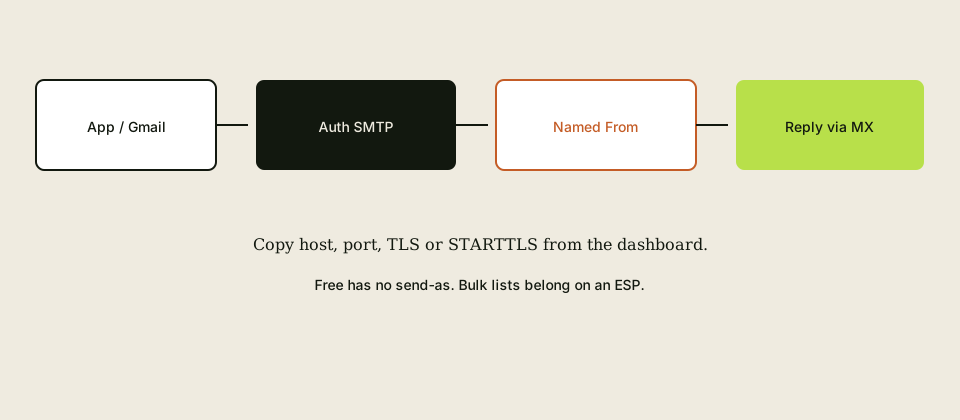
The client—Gmail, Outlook, WordPress, a small app—opens an authenticated session to the SMTP host. The provider checks credentials, plan, From allow-list, and rate limits. The message leaves with your domain’s DKIM if you published the dashboard records. Receivers evaluate SPF on that hop, DKIM, and DMARC alignment. IETF RFC 5321 — Simple Mail Transfer Protocol does not care that you also have an ESP. Each message is its own hop.
Replies go to Header From or Reply-To. If that local-part is not a named alias on one MX set, the conversation dies. Low-volume SMTP without inbound routing is a megaphone. MailerZ inbound uses envelope SRS only. Header From, Subject, Date, Message-ID, body, and MIME stay as written on the forward hop into Gmail.
An ESP typically injects via its own API or SMTP. It may rewrite unsubscribe headers and tracking. That is appropriate for campaigns. It is noise on a password reset. Do not run resets through a tracking domain you use for clicks in newsletters unless you understand the extra hops. Simple SMTP for operational mail keeps the path short.
Open relay is not a growth hack. MailerZ answers unauthenticated use with 550. Authenticated but disallowed use with 550 5.7.1. Hitting a cap and then pointing WordPress at the host without a password will not “queue the rest.” It will fail closed. That is the correct failure.
STARTTLS versus implicit TLS is a dashboard pair, not an ESP default. Mixing a Mailgun wizard with MailerZ credentials is a handshake error waiting to happen. Copy the pair from the product you are authenticating to.
Step-by-step setup / decision path

- Write two lists: operational message types and campaign message types. If a type sits on both lists, split it. “We miss you” is a campaign even if it mentions an invoice.
- For each operational From, create a named alias to the inbox that will handle replies. Hold unknown recipients. Prove inbound from a third mailbox.
- Confirm leftover MX is gone. Split hosts make confirmation mail and replies look random.
- Upgrade off Free if you must send. Copy SMTP host, port, TLS or STARTTLS, and credentials from the MailerZ dashboard.
- Publish sending DNS as the dashboard shows. Do not append a second SPF record for the ESP in a way that duplicates
v=spf1. One SPF string, includes as needed, stay under lookup limits. - Attach SMTP to Gmail Send mail as, Outlook, or the app. Treat as alias in Gmail. Prove Header From on a third mailbox with a unique subject.
- Keep the ESP for the campaign list. Separate API key. Separate From if counsel wants a
news@versusbilling@. Same domain is allowed if both are named and aligned. - Write the cap: Solo 20 send-as per hour, 2,500 outgoing per month. If a launch will exceed that, the launch is not a MailerZ SMTP job. Move it or change the plan. Confirm live numbers on the pricing page.
- Rotate SMTP secrets when people leave. Do not store them in a public repo or a Slack thread.
If you only have campaigns, you do not need MailerZ SMTP. You may still want aliases for hello@ inbound. If you only have replies and receipts, you do not need an ESP. Buy the job you have.
Measure volume for a quiet week before a sale. Count password resets, form notifies, and human replies. If that count fits the cap with margin, SMTP is enough. If the sale email is 2,000 addresses, that week’s campaign is an ESP job even if Tuesday’s receipts stay on SMTP.
Failure modes and proof
CSV import into SMTP: cap or 550 5.7.1. Proof: the job was a list. Use an ESP.
ESP used as a helpdesk: agents cannot find threads. Proof: customers reply and nobody in Gmail sees them. Put support@ on an alias.
Free-plan send-as: nothing authenticates. Proof: plan page. Upgrade.
Invented ports: TLS errors. Proof: dashboard versus plugin or Gmail form.
Send through Gmail with a custom From: alignment fails. Proof: authentication results on a third mailbox.
Duplicate SPF records: some receivers fail SPF. Proof: two v=spf1 strings on the same name. Flatten to one.
Shared secret in chat: a leaver still sends as billing. Proof: rotate and list every client.
Staging WordPress on production SMTP: fake orders reach customers. Proof: isolate staging.
Open relay “workaround” after a cap: 550. Proof: logs. Wait or upgrade. Do not remove auth.
Self-send tests: Gmail lies. Proof: third mailbox only.
Tracking domain on resets: users click a wrapper and distrust the reset. Proof: raw links on operational mail.
Leftover MX: inbound replies vanish. Proof: public MX lookup.
MailerZ workflow and product boundary
MailerZ is custom-domain aliasing and forwarding with optional paid send-as. Secuno LLC operates mailerz.net. The app is mail.mailerz.net. It is not a bulk ESP, not Workspace, not IMAP, and not an open relay.
Operational path: verify domain, one MX set, named aliases, hold unknown, prove inbound, upgrade, copy SMTP, send as a named From, prove Header From. Envelope SRS inbound. Headers and body intact. Recovery fourteen days on Free, ninety on paid.
Free: no send-as. Solo: forty dollars a year, twenty-five aliases, ninety-day store, 2,500 outgoing per month, 20 send-as per hour. Starter: eight dollars a month or eighty a year. Business: nineteen or one hundred ninety. Agency: thirty-nine or three hundred ninety. Quote the live page if numbers move.
This article does not invent SOC 2, ISO, HIPAA, SLAs, or inboxing rates. It does not claim MailerZ replaces Mailchimp, Klaviyo, or Postmark for campaigns. Postmark-like transactional ESPs are a valid alternative if you already pay for them and only needed API mail. You still want a named alias for replies.
Cost, alternatives, and trade-offs
An ESP plus unused Workspace seats is the expensive default. Low-volume SMTP on Solo is cheaper when the job is replies and a few receipts. An ESP monthly minimum is cheaper than burning a reputation by blasting from reply SMTP. Buy both only when both lists exist.
Transactional ESPs (API receipts at scale) sit between MailerZ and a newsletter tool. If you send thousands of receipts a day, you may outgrow hourly send-as. That is a volume move, not a reason to skip named aliases. Inbound still needs MX and a destination inbox.
Doing nothing keeps personal Gmail on invoices and php mail on WordPress. You will look unprofessional on the messages that matter most, then pay an ESP to decorate the newsletter. Reverse that. Fix operational From first.
Agency retainers should price SMTP setup and ESP setup as different line items. Bundling them as “email” hides the cap conversation until launch week.
If the only pain is inbound role addresses, you may not need SMTP yet. Free can receive. Add send-as when someone must reply as the domain or an app must send as the domain.
Warm-up folklore from ESPs does not translate to five messages an hour. Do not delay a password-reset From for a thirty-day warm. Prove one message to a third mailbox. Then use the identity for real operational mail. Campaign warm-up stays on the ESP.
Support tickets that attach “please add our IP to your ESP” are usually leftover thinking. MailerZ send-as is authenticated user traffic, not a dedicated IP product this article can promise. If a receiver blocks you, collect the SMTP response and the third-mailbox headers. Do not invent an IP allow-list as a MailerZ feature.
Calendar invites and PDF invoices are still operational if a human might reply. They still count against the hourly cap. A Friday batch of 80 invoices can fail on Solo even though “it is not marketing.” Split the batch or upgrade. The cap does not read intent. It reads count.
If two founders share one SMTP user, you cannot tell who sent a bad reset. Prefer one identity per app or per role, within alias limits. Free has ten aliases and no send-as. Paid plans raise the ceiling. Do not create a dozen Froms you will not staff inbound.
Field notes for operational SMTP versus an ESP
Write the volume before you pick a product
Low-volume SMTP for operational email is one authorized message per real event: reset, receipt, invite, probe. A nightly digest to everyone is a campaign. A purchased list is abuse. Warm-up is out of scope. MailerZ paid send-as is the hop for operational events inside published caps. A bulk ESP is the product for campaigns. Mixing them — blasting through MailerZ because the password was handy — is how you hit a cap and look like a list.
Count resets per day, receipts per day, peak hour. Solo is 2,500 outgoing and 20 send-as per hour. If launch invites two hundred people in ten minutes, quote a higher card or an ESP the morning you plan it. Confirm pricing. Caps are not inbox SLAs.
Idempotency is app work
Users double-click forgot-password. Key the event. 250 means do not send again for that key. 4xx backoff same key. 5xx stop and page. A worker that replays a queue after deploy must skip successes. That is not MailerZ. That is your table.
Staging uses a separate From or domain. A staging loop against production SMTP spends the cap and surprises users. Close port 25 on the app host. Submit to the dashboard port.
What an ESP is for
Newsletters, promotions, purchased lists, warm-up, and deliverability programs are ESP jobs. Quote those vendors live. Do not ask MailerZ to grow a campaign stack. CAN-SPAM still applies if you dress a campaign as a notification. We will not help dump users.
MailerZ Free is one domain, ten aliases, one seat, a 14-day store, send-as disabled, SMTP and API disabled, and unrouted mail held or rejected only. Solo is $40 per year only. Starter is $8 monthly or $80 yearly. Business is $19 or $190. Agency is $39 or $390. Unlimited is $99/month or $990/year. Confirm numbers on the pricing page. Limits are not an inbox-placement promise. MailerZ is inbound MX plus authenticated SMTP from Secuno LLC. Envelope SRS only. Header From, Subject, Date, Message-ID, body, and MIME are never rewritten. Not Google Workspace, not IMAP or POP, not an open relay. Unauthorized send is SMTP 550 / 550 5.7.1. Leftover MX is a hard stop. Self-send from Gmail to the same Gmail account can hide routing errors. Not SOC 2, not ISO 27001, not HIPAA.
Worked story
A startup sent weekly product emails through MailerZ SMTP. Hourly cap hit on send day. Real password resets 550’d. They moved the weekly to an ESP, kept resets on notify@, and proved one third-mailbox reset. The ESP was the right campaign tool. MailerZ was the right operational hop.
A second team called MailerZ an ESP in a procurement deck. Counsel asked for campaign suppression lists. They rewrote the deck to operational SMTP, pointed at the security page, and stopped promising blast features.
Close criteria
Event budget written. Campaigns off this hop. Paid SMTP, mapped From, idempotent keys, one unique 250, closed 25, exclusive MX if users reply. Free cannot send-as. Related: app notifications from your domain, VPS SMTP test, transactional website email without Postfix. Start free for inbound. Solo when the first reset must leave as the domain.
Operator packet for operational versus campaign mail
Split the calendar
Resets, receipts, and invites stay on MailerZ paid SMTP inside caps. Weekly product mail, promotions, and lists move to an ESP. If you cannot write the event count, you will hit a cap and call it an outage. Solo is 20 send-as per hour and 2,500 outgoing. Confirm pricing the morning of a launch, not during the 550s.
Keys and staging
Event UUID on the row. Skip 250 keys on replay. Staging pair on staging From. Port 25 closed. Dashboard submit only. CAN-SPAM if someone proposes a list. We will not help dump users. Not a warm-up hop.
Procurement English
Say operational authenticated SMTP. Do not say ESP, campaign cloud, or inbox SLA. Point at security. Not SOC 2. Hop store is not a suppression list.
Done
Event budget written. Campaigns off this hop. One third-mailbox 250. Worker skips successes. Start free for inbound. Solo when notify@ must travel. Related app-notification and VPS test pages.
Definition of done
Low-volume operational SMTP is finished when the event budget is written, campaigns live on an ESP, MailerZ paid SMTP sends one authorized message per keyed event, staging is isolated, port 25 is closed, and one third-mailbox 250 exists. Weekly product mail through this hop is a campaign wearing a notification label. Caps are published. Confirm pricing the morning of a launch. Start free for inbound. Solo when notify@ must travel.
Procurement gets operational authenticated SMTP, not ESP, not inbox SLA, not SOC 2. CAN-SPAM if someone pastes a list. Workers skip 250 keys. Related app-notification and VPS test pages. MailerZ will not grow a blast stack.
Proof you can keep
A volume split you can take to finance
Column A: resets, receipts, invites — MailerZ paid SMTP, keyed events, published caps. Column B: weekly product mail, promotions, lists — ESP, their live price. If someone puts column B through MailerZ because the password was handy, you will hit a cap and surprise real resets. Write both columns before the launch. Confirm pricing the same morning.
Staging isolated. Port 25 closed. Worker skips 250 keys. Procurement hears operational SMTP, not campaign cloud. Start free for inbound. Solo when notify@ must travel. Not a warm-up hop. Not SOC 2.
FAQ
- What is the safest way to handle low volume smtp service?
- Use authenticated SMTP for named operational From addresses: receipts, password resets, and human replies. Keep newsletters on a bulk ESP with unsubscribe. Prove inbound on the alias first. Copy host, port, and TLS or STARTTLS from the dashboard. MailerZ Free cannot send-as. Respect hourly caps. Never remove authentication to “go faster.”
- Does this require a new mailbox?
- No. Low-volume SMTP is an outbound hop. MailerZ is Mail Box portal webmail (Inbox, Sent, New email). It is not IMAP or POP. Gmail or Outlook stays the store. Buy a mailbox seat only when someone needs a hosted archive or a suite, not because a form or a reply must look like the domain.
- Will it work with Gmail or Outlook?
- Yes as the compose client when you add Send mail as or a manual Outlook SMTP identity using dashboard values. Inbound replies work when the From is a named alias that forwards to those inboxes. Interface labels vary. Free cannot send-as on either client.
- What DNS records are involved?
- Verification TXT, one MX set for inbound aliases, leftover Google or Microsoft MX removed, and the SPF, DKIM, and DMARC values the dashboard shows for sending. SMTP port numbers are not DNS. Copy them from the app, not from a generic ESP tutorial.
- What should I test before production?
- Send a unique inbound to the named From from an unrelated provider. Then send one operational message through SMTP to a third mailbox and read Header From. Trigger a real receipt or reset, not only a plugin toast. Self-send from Gmail to the same Gmail can hide both paths. A list blast is the wrong test.
Key takeaways
- A low volume SMTP service is for receipts, resets, and human replies as a named From.
- Bulk ESPs are for lists, campaigns, and unsubscribe. Do not import a CSV into reply SMTP.
- MailerZ Free cannot send-as. Paid plans copy dashboard host, port, and TLS or STARTTLS.
- Solo caps matter: 20 send-as per hour, 2,500 outgoing per month. Quote pricing live.
- Every operational From needs a named inbound alias and leftover-MX cleanup.
- Open relay is 550. Caps are 550 5.7.1. Do not remove auth.
- Prove Header From on a third mailbox. Self-send can lie.
- You can run SMTP and an ESP on one domain if DNS and secrets stay honest.
Conclusion
Pick the tool that matches the conversation. SMTP when someone might write back. An ESP when you are talking to a list. MailerZ is the SMTP-plus-alias path, not a campaign platform.
Prove inbound on the free plan, upgrade when you must send as the domain, and keep the newsletter where it belongs.