The best email alias service for business role addresses is the one that keeps support@, billing@, and jobs@ stable while people change. It is not a privacy-mask farm and not a mailbox suite. You want named routes into inboxes you already use, one MX set, hop evidence, and send-as only when those roles must reply as the domain.

Quick answer for best email alias service business
Pick a custom-domain alias service when the printed string must survive staff turnover. The internet delivers to a local-part. IETF RFC 5321 — Simple Mail Transfer Protocol does not care who sits in the chair. The receiving system either stores that local-part as a mailbox or routes it. Business roles almost always want the route. Buying a mailbox per role is how unread seats accumulate.
“Best” is job-specific. Google’s helpful-content guidance is the right instinct here: answer the task the searcher has, not a trophy adjective. See IETF RFC 5321 — Simple Mail Transfer Protocol for transport and Google’s creating helpful content documentation for why this page refuses a universal winner table. A privacy-alias product that mints you+shop@provider.com is best for throwaway signups. A suite is best when every human needs a hosted store. A focused forwarder plus authenticated SMTP is best when Gmail or Outlook already holds the archive.
MailerZ is that focused option: inbound MX plus paid send-as, operated by Secuno LLC. Envelope MAIL FROM can use SRS. Header From, Subject, Date, Message-ID, body, and MIME are never rewritten. It is not Google Workspace, not IMAP, and not an open relay. Unhosted or unauthorized recipients get SMTP 550 / 550 5.7.1.
Free is one domain, ten aliases, one seat, a 14-day store, send-as disabled, SMTP and API disabled. That is enough to prove hello@. It is tight for four public roles. Solo is $40 per year: twenty-five aliases, 90-day store, 2,500 outgoing, 20 send-as per hour. Starter is $8 or $80: eight domains, fifty aliases, five seats, 5,000 outgoing, 40 per hour. Business is $19 or $190. Agency is $39 or $390. Unlimited is $99/month or $990/year. Confirm MailerZ pricing. Limits are not an inbox SLA.
Features and capacity live on MailerZ features. If you are leaving another forwarder, use the migration planner and keep a rollback MX plan until an external probe passes. The homepage pitch is still the same: receive, reply, and send as your domain — mailerz.net.
The user problem and the decision criteria
The usual mess is a shared password on support@gmail.com, or a Workspace seat named Support that nobody opens, or twenty plus-tags pretending to be departments. Customers type the role they were told to type. Finance wants billing@ on the invoice. HR wants jobs@ on the careers page. Those strings outlive the intern.
A second mess is catch-all as a substitute for naming roles. Guessed local-parts flood the queue. Nobody owns them. The “best” service then looks noisy. Named aliases plus hold-unknown is the safer business default.
| Question | If yes | If no |
|---|---|---|
| Must the public string stay when the person changes? | You need a named alias with a replaceable destination. | A personal mailbox name may be enough. |
| Do people already live in Gmail or Outlook? | Route into those stores. Do not invent IMAP. | You may be shopping for mailboxes, not aliases. |
| Must the role reply as the domain? | You need authenticated SMTP send-as, not inbound only. | Inbound aliases can be the whole first year. |
| Is this a privacy mask for random sites? | Use a privacy-alias product. Different category. | Stay on durable custom-domain roles. |
| Will you print more local-parts than the plan allows? | Count aliases before you buy. Free has ten. | Start Free and prove inbound. |
Plus addressing is not a role address. IETF RFC 5233 — Sieve Email Filtering: Subaddress Extension describes subaddressing. Gmail implements it on Gmail’s own domain; see Google Gmail Help — Using an address alias (plus addressing). founder+press@brand.com is an unknown recipient on a MailerZ domain unless you mapped that exact local-part or enabled paid catch-all forward. Do not publish plus tags as department names.
Shared mailboxes inside a suite are still stores. They are useful when several people must search one corpus. They are wasteful when three people only need a copy in the inboxes they already live in. Route first. Promote to a shared mailbox after the search-and-assign job shows up in real work.
Procurement forms are a quiet killer of plus-tags and of cute abbreviations. A vendor portal that rejects + or stores ap@ as a login you cannot change will outlive your alias fashion. Print a boring local-part. Map it once. Do not encode the current contractor’s name in the public string. That is how sarah-invoices@ becomes a tombstone.
Multi-brand operators should count domains before they count adjectives. Solo is one domain. Starter is eight. Business is twenty-five. Agency is one hundred. “Best for business” on a five-brand studio is a domain-ceiling question, not a review-site medal. Confirm those numbers on the pricing page. They change only when the product changes, not when a blog mood changes.
Compliance theater is the other false “best.” MailerZ does not hold SOC 2, ISO 27001, or HIPAA. If a questionnaire requires those badges on the mail store, you are buying a mailbox product with a report, not an alias layer. Quote the Security and Trust Center. Do not invent a certificate to win a role-address bake-off.
Technical mail flow
A customer writes to billing@yourdomain.com. Their server looks up MX. If MailerZ MX is the answer, the edge checks verification and the alias. The route copies to one or more destinations. Header From stays the customer. Envelope return path may use SRS. Delivery history records the destination SMTP response. Gmail can still junk the copy.

Inbound roles
Unknown local-parts on Free are held. Paid catch-all forward is optional and noisy. Businesses should name support, billing, hello, jobs, and press explicitly. Typos then sit in hold instead of landing in a random inbox. That is the safer posture while you learn volume.
Outbound roles
Receiving is not sending. Free has no send-as. Paid SMTP is capped per hour and per month. Ten agents sharing support@ share those caps. Starter’s 5,000 outgoing per month is a team number. Campaign mail belongs on a campaign platform. MailerZ is not that platform. Gmail’s client labels are in Google Gmail Help — Send mail from a different address.
Authentication
IETF RFC 7208 — Sender Policy Framework (SPF), IETF RFC 6376 — DomainKeys Identified Mail (DKIM), and IETF RFC 7489 — Domain-based Message Authentication, Reporting, and Conformance (DMARC) evaluate the sending identity. Publish the dashboard values for paid send-as. A forwarder that rewrites Header From breaks alignment. MailerZ does not rewrite Header From. Leftover MX is unrelated to DMARC and still a hard stop.
Loops happen when a destination points back at the same alias. Do not do that. Do not point two forwarders at each other. One MX set, one delivery layer, destinations that are real mailboxes.
Step-by-step setup and decision path
Inventory beats branding. Write the roles before you pick a logo color.
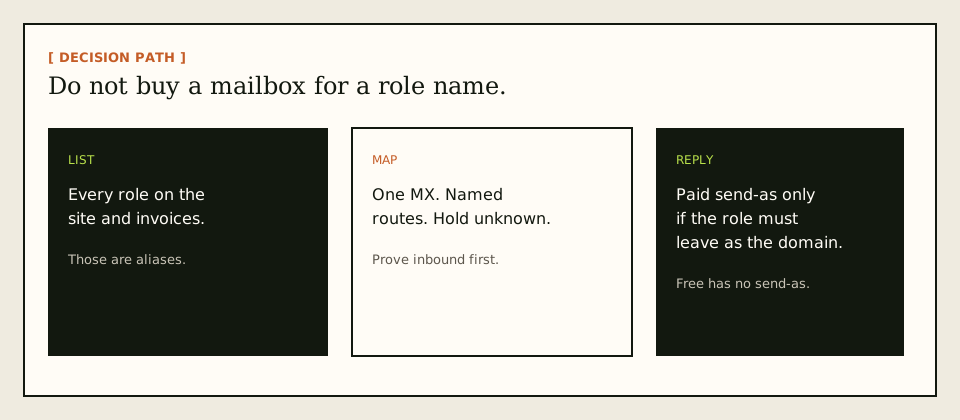
List every printed role
Website footer, invoices, App Store, job posts, support macros, procurement forms. If it is typed by a stranger, it is an alias candidate.
Name the store for each human
Gmail, Outlook, or a suite seat they already have. Do not create a mailbox named Support unless someone will live there.
Add one domain and verify
Root domain, unique verification TXT, receiving off until the check passes. Map the named aliases. Complete destination verification.
Publish one MX set and delete leftovers
Leftover Google, Microsoft, or registrar MX is a hard stop. Public lookup from two resolvers. Then probe each role from an unrelated mailbox.
Assign owners, not shared passwords
The destination inbox has the password. The alias does not. When someone leaves, change the destination. Do not rotate a mythical support@ login.
Add send-as only for roles that reply
Upgrade off Free. Copy SMTP values. Connect Gmail or Outlook. Send outward to a second external inbox.
jobs@can wait.Watch hold and history for a week
Promote the plan for alias, seat, store, or send ceilings you actually hit. Do not promote it because the word “business” appears in the title.
If you are moving from another forwarder, keep the old MX documented until the probe passes. The migration planner is the checklist, not a magic cutover.
Failure modes and proof
Role-address failures are usually inventory or MX. Proof is a uniquely titled external message, a sanitized destination view, and a history row with a remote SMTP response.
| Symptom | Likely cause | What to check |
|---|---|---|
| Cannot log into support@ | It is an alias. | Open the destination inbox. |
| Some vendors reach the old host | Leftover MX. | One MX set. Two resolvers. |
| Replies leave as @gmail.com | No send-as or default identity. | Paid SMTP. From selector. |
| Held mail nobody watches | Unknown local-parts plus no queue habit. | Name the printed roles. Review hold. |
| 550 mid-month on support replies | Outgoing or send-as/hour cap. | Plan counters. Campaign mail elsewhere. |
| Plus-tagged role never arrives | Exact local-part not mapped. | Create the named alias. Do not assume plus stripping. |
| Self-send missing | Gmail short-circuit. | External probe. Expected. |
MailerZ does not claim SOC 2, ISO 27001, HIPAA, review counts, or an uptime SLA. Controls wording lives on Security and Trust Center. Do not send SMTP passwords to support.
MailerZ workflow and product boundary
MailerZ is a custom-domain email delivery layer operated by Secuno LLC. Point MX at MailerZ. Mail for a hosted, verified domain can land in Gmail or Outlook. Paid plans add authenticated SMTP so the same domain can send and reply. The live site is mailerz.net. The app is mail.mailerz.net.
Positioning: a focused custom-domain forwarding plus authenticated SMTP option for durable role addresses. It is not the best privacy mask, not the best suite, and not the best newsletter engine.
What MailerZ does in this workflow
- Accept inbound mail for verified domains and configured role aliases.
- Preserve Header From on the forward.
- Hold or forward unknown recipients according to plan and settings.
- Store messages for 14 days on Free or 90 days on paid plans.
- Send through authenticated SMTP from approved identities on paid plans.
- Record delivery history for inbound and outbound hops.
- Cap domains, aliases, seats, and send volume by plan.
What MailerZ does not do
- Replace Gmail or Outlook with IMAP or webmail.
- Rewrite header From, Subject, Date, Message-ID, body, or MIME.
- Offer send-as on Free.
- Promise inbox placement, uptime SLAs, or review counts.
- Claim SOC 2, ISO 27001, or HIPAA.
- Act as an open relay. Unauthorized send gets 550 / 550 5.7.1.
- Mint disposable privacy masks on a shared provider domain.
MailerZ seats are operators. One admin can run roles for a ten-person Gmail team. Count seats only if many people must open the dashboard. Count aliases against the printed list. Count outgoing against reply volume on the roles that send.
Cost, alternatives, and trade-offs
A suite seat per role is the expensive habit. A privacy-alias subscription is the wrong habit for invoices. A registrar forwarding toggle is the thin habit: often no leftover-MX stop, no stored failed hop, no send-as. MailerZ sits in the operational middle. Compare live competitor plans rather than memory. ImprovMX is the closest commercial forwarding class. Cloudflare Email Routing is inbound routing.
| Approach | You get | You give up |
|---|---|---|
| Mailbox seat per role | A store and a login. | Unread seats and painful turnover. |
| Privacy aliases | Fast masks. | No durable brand role on your domain. |
| MailerZ named aliases | Routes, hop evidence, paid send-as. | No hosted mailbox. Published ceilings. |
| Inbound-only Free | Proof of inbound roles. | No send-as. Short store. Ten-alias cap. |
Four printed roles and one operator usually fit Solo if outbound stays under 2,500 per month. A support team that replies all day may need Starter or Business for outgoing and send-as/hour, not for more mailboxes. Agency is for domain portfolios you can name. Confirm cards on pricing before you quote a board deck.
Hidden cost is leftover MX from a suite trial. The alias service looks broken. The DNS is split. Clean MX first. Then judge the product.
Time cost is ownership. A role without a human who reads the destination inbox is a decorative DNS record. Assign an owner in the same week you map the alias. When they leave, the destination edit should be on the offboarding checklist next to the laptop. That checklist is cheaper than a new mailbox vendor.
Compare adjacent guides without cannibalizing them. Alias versus mailbox is the object lesson. Alias versus plus addressing is the naming lesson. This page is the buyer lesson for printed roles. If you already decided you need named custom-domain routes, the remaining work is MX, proof, and plan ceilings — not another adjective.
Registrar “email forwarding” toggles often look free and finish none of the business jobs: leftover-MX stop, stored failed hops, hold-unknown, send-as. They can be fine for a parked personal domain. They are a poor best-in-class answer for invoices and careers pages. Read the hop. If you cannot see why a message died, you cannot run a role.
Operator brief
A longer operator brief for best email alias service business
Teams that bookmark Best Email Alias Service for Business Role Addresses usually arrive after a missed invoice, a form that never notified anyone, or a migration that looked clean in one resolver. The useful brief is still boring. Name the store. Name the printed local-parts. Name the nameservers that actually answer. Publish one MailerZ MX set. Delete leftover hosts. Probe from a mailbox that is not the destination. Only then talk about best email alias service business as a send-as, catch-all, or comparison problem.
MailerZ remains inbound MX plus authenticated SMTP around Gmail or Outlook. Envelope SRS only. Header From, Subject, Date, Message-ID, body, and MIME stay intact. It is Mail Box portal webmail, not IMAP, not POP, and not an open relay. Unauthorized send is 550 / 550 5.7.1. Free cannot finish send-as: SMTP and API stay off. Solo is $40 per year when the domain From must travel. Starter is $8 or $80. Business is $19 or $190. Agency is $39 or $390. Unlimited is $99/month or $990/year. Confirm the live pricing page. Those numbers are ceilings, not an inbox-placement service-level agreement.
If leftover Google, Microsoft, Cloudflare routing, or registrar MX is still public, stop widening best email alias service business. The map you built never saw that copy. Priority numbers are an order, not load balancing. A higher preference host is idle while a leftover host still accepts mail. Save the old MX set before you delete anything. Check more than one public view because TTL lies.
Catch-all forward is not a safety feature for best email alias service for business role addresses. Hold unknowns on everyday production. Review the store. Promote a leftover only when a real person used it. Paid forward belongs to a dated cutover. Fan-out of unknowns into two inboxes trains two spam buttons. Plus addressing on Gmail is not a custom-domain unknown policy. MailerZ will not strip plus tags on your domain the way Gmail does on @gmail.com.
Send-as is a second hop. Creating an inbound alias does not approve outbound. Catch-all does not mint a From. Copy the dashboard host, port, and TLS pair together. Set From to an identity you created. Do not paste a Gmail password into a CMS, a cron file, or a ticket. Do not mail SMTP secrets to support. Send a 550 line, a timestamp, and a Message-ID. Rotate if a secret already leaked.
Self-send from Gmail to the same Gmail account can short-circuit. That green result is why people swear best email alias service business works while customers vanish. Use a second provider. Put a unique subject on the probe so delivery history is searchable. If Header From was rewritten by some other forwarder, authentication stories get noisier. MailerZ does not rewrite Header From on inbound.
Agencies should keep best email alias service business per client zone. Separate SMTP credentials. Do not pour every client into one catch-all because the spreadsheet got long. Agency plan capacity exists so you can hold more domains and aliases. It does not replace a named list. Offboard means delete MX you own, revoke SMTP, and stop forwarding leftovers into the agency inbox.
Legal and security questions have published answers on the security, privacy, terms, DPA, and subprocessors pages. MailerZ is not SOC 2, not ISO 27001, and not HIPAA. The 14-day Free store, the 90-day Solo–Agency store, and the 180-day Unlimited store are recovery windows for hops this layer saw. They are not an archive and not legal hold. If counsel wants eDiscovery, buy eDiscovery.
Comparisons only help after the hop is honest. Cloudflare Email Routing is inbound routing. A privacy-mask product hides a destination on a provider domain. A suite hosts mailboxes, Calendar, and admin. Proton-class mailboxes encrypt a store. MailerZ is the delivery layer when you already have Gmail or Outlook and you need a domain route you can prove. Cite the other product’s documentation. Do not invent feature parity.
When Best Email Alias Service for Business Role Addresses is closed, the next physical action is a lookup and a probe, not another tab. Start free on one domain you can break. Sign in if the zone already lives here. Review quarterly, or sooner after a nameserver move, a plugin swap, or a staff departure. That is how best email alias service business stays a runbook instead of an incident.
A second worked pass for best email alias service business: write the last change on a sticky note before you open the dashboard. Nameserver move, leftover MX, new form plugin, contractor laptop, or a registrar forwarding toggle are the usual five. MailerZ history only shows hops that reached this layer. If the sticky note says leftover MX, you do not have a best email alias service business mystery. You have a split. Delete the leftover. Wait for TTL. Probe again.
A third worked pass: print the public list. If you cannot print it, you are not ready for production unknowns and you are not ready for a bigger alias ceiling. Unlimited aliases as marketing will not save a missing list. Ten named aliases on Free are enough to stop printing a personal Gmail on a homepage. Grow the list when a real person used a leftover, not when a harvest guessed admin@.
FAQ
What is the safest way to handle best email alias service business?
List every role address you print, keep the inboxes people already use, map named aliases on one verified domain, publish one MX set, delete leftover host records, and prove inbound from a different mailbox. Enable paid send-as only for roles that must reply as the domain. Hold unknown recipients until you have a reason to forward them.
Does this require a new mailbox?
No. A business role alias is a route, not a login. MailerZ is Mail Box portal webmail (Inbox, Sent, New email). It is not IMAP or POP. Gmail or Outlook remains the store. Buy a mailbox seat only when someone needs a hosted archive or a suite.
Will it work with Gmail or Outlook?
Yes for inbound aliases when destinations are mailboxes those products already provide. Paid MailerZ send-as uses Gmail Send mail as or a manual Outlook SMTP identity. Interface labels vary by Outlook version.
What DNS records are involved?
A verification TXT, one MX set, leftover MX removal, and the SPF, DKIM, and DMARC values shown in the dashboard if roles also send. Split leftover Google or Microsoft MX loses mail in a pattern that looks random.
What should I test before production?
Send a uniquely titled message from an unrelated provider to each printed role. Confirm Header From and delivery history. Then send outward from any role that must appear in public. Self-send from Gmail to the same Gmail account can hide routing errors.
Key takeaways
- The best email alias service for business role addresses keeps printed names stable and destinations replaceable.
- An alias is a route. A mailbox is a store. Do not buy a store for a role.
- MailerZ is a focused custom-domain layer, not a suite and not a mask farm.
- Header From stays. Envelope SRS is the allowed rewrite.
- Leftover MX is a hard stop.
- Name roles. Hold unknown. Catch-all is a policy with spam cost.
- Free has ten aliases and no send-as. Count before you print.
- Outgoing caps are shared across the roles that send.
- Test inbound from another mailbox. Self-send lies.
- MailerZ is not SOC 2, not IMAP, and not a bulk sender.
Conclusion and next action
If you came here for the best email alias service for business role addresses, write the strings customers already type. Keep the inboxes your people already search. Map those strings. Prove inbound. Pay when send-as, alias count, or store days require it.
MailerZ fits that job when you want hop evidence and paid SMTP on a domain you own. It does not fit when you need a hosted mailbox for every user, disposable masks, a certified compliance report, or campaign-scale sending. Start on Free if you only need to watch inbound. Move to Solo or another paid plan when the roles must reply as the domain.
Next action: add one domain, create support@ or hello@, and send a uniquely titled message from a mailbox that is not the destination. Then list the remaining printed roles against the plan ceiling. If eleven roles remain unmapped, you already know Free’s ten-alias cap is the next decision, not a branding workshop. The register path is one domain, not a suite migration. Read the MailerZ docs if you want the MX steps spelled out, and use Mailbox only as the stored-hop view — it is not IMAP.
Ready to test both directions
Start free with one domain and prove the path.
Inbound role aliases on Free. Paid send-as when the role must travel. Sign in if the domain is already there.
Review quarterly, or sooner if MailerZ plan limits, provider MX behavior, or DNS guidance changes. Author: MailerZ editorial, Secuno LLC.